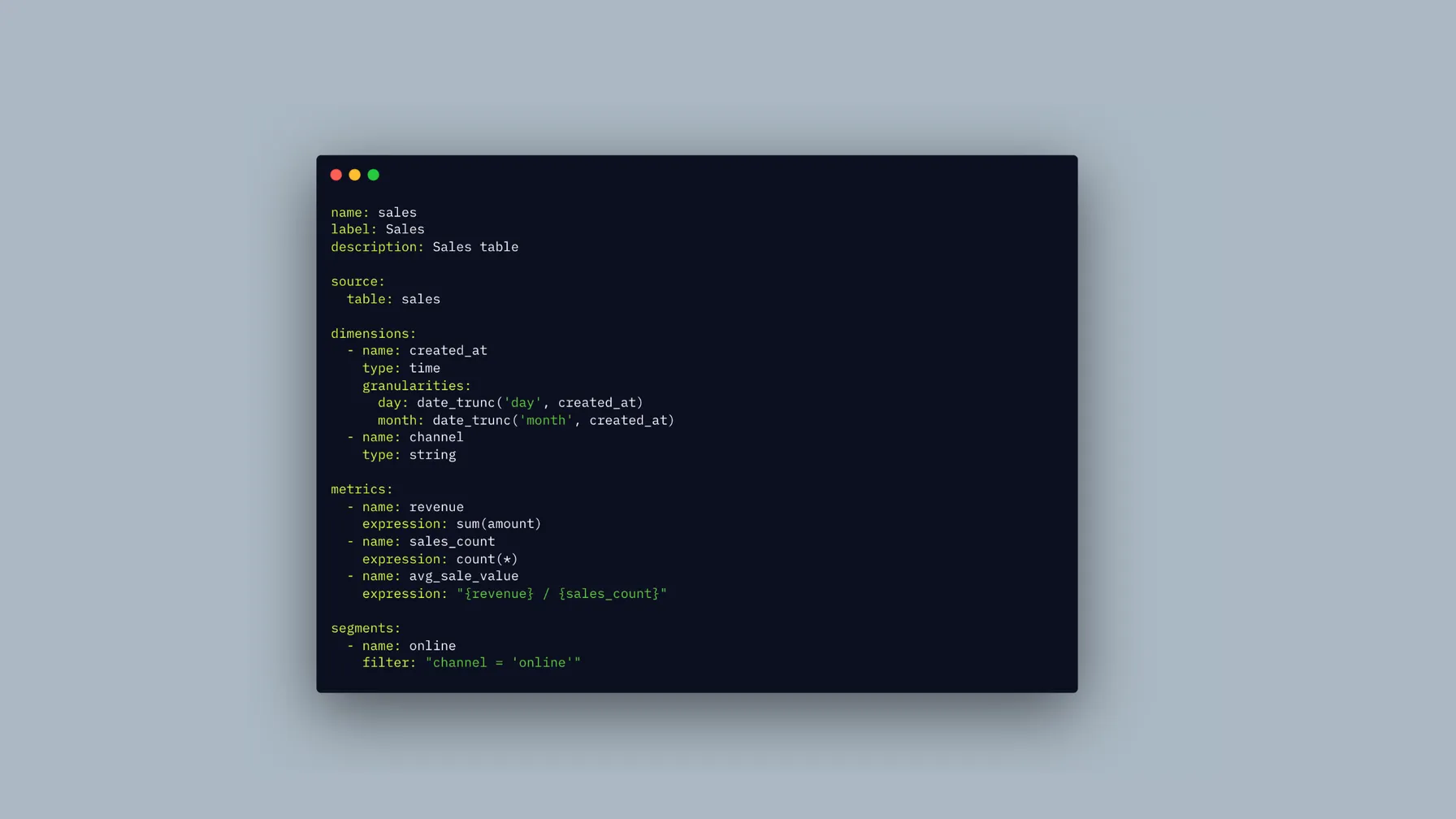
The best semantic layer tools in 2026 are dbt Semantic Layer, Cube, Looker, Power BI semantic models, Tableau Semantics, AtScale, Lightdash, and Bruin CLI / DAC.
There is no single best semantic layer tool for every company. The right choice depends on where your metric definitions should live, who reviews them, which BI or AI tools need to query them, and how much governance your team needs.
Most teams are choosing between a few patterns:
- If your analytics logic already lives in dbt, start with dbt Semantic Layer or Lightdash before rebuilding the same metrics inside a BI tool.
- If business users mostly live in one BI platform, Looker, Power BI, or Tableau semantic models can be the right source of truth, but portability becomes the tradeoff.
- If APIs, embedded analytics, or AI agents need governed metrics outside BI, look at Cube, AtScale, Bruin CLI / DAC, or dbt Semantic Layer integrations.
Short answer:
- Choose dbt Semantic Layer if your analytics logic already lives in dbt and metrics should be reviewed with dbt models.
- Choose Cube if you need a headless semantic layer for embedded analytics, APIs, applications, or AI agents.
- Choose Looker if LookML is already your governed BI modeling layer.
- Choose Power BI semantic models if your company is standardized on Power BI, Fabric, Excel, and DAX.
- Choose Tableau Semantics if Tableau and Salesforce Data 360 are strategic parts of your analytics stack.
- Choose AtScale if you need enterprise-wide semantic governance across many BI tools, teams, and AI systems.
- Choose Lightdash if you want open-source-friendly BI with dbt-native metrics.
- Choose Bruin CLI / DAC if you want repo-level semantic YAML, CLI queries, dashboards-as-code, git review, validation, and AI-agent-friendly workflows.
The biggest difference between semantic layer tools is not syntax. It is ownership: where definitions live, who reviews them, how changes are tested, and which tools are allowed to consume governed metrics.
Best Semantic Layer Tools Compared
| Tool | Where definitions live | Useful when | Main tradeoff |
|---|---|---|---|
| dbt Semantic Layer / MetricFlow | dbt project YAML | Teams already using dbt want metrics defined near transformation logic | Works most naturally when dbt is already the center of the analytics workflow |
| Bruin | Repository-level semantic/ YAML files, dashboards as YAML or TSX | Headless, code-first BI: governed metrics queried from the CLI or an API, dashboards reviewed in git, and AI agents that need governed context | Code-first; business users who want drag-and-drop authoring need a BI tool on top |
| Cube | Code-first Cube models | Embedded analytics, customer-facing dashboards, APIs, and AI agents | More infrastructure and modeling work than a simple BI-native layer |
| Looker / LookML | LookML projects | Teams using Looker as the main governed BI layer | Strong inside Looker, less neutral if every downstream tool should be equal |
| Power BI semantic models | Power BI and Fabric models with DAX | Microsoft-heavy organizations using Power BI, Fabric, Excel, and Teams | Very natural for Power BI, less portable outside the Microsoft ecosystem |
| Tableau Semantics | Tableau and Data 360 semantic models | Tableau and Salesforce-oriented analytics teams | Tied to the Tableau and Salesforce direction |
| AtScale | Universal semantic model platform | Large teams with many BI tools, governance needs, and performance constraints | Enterprise platform weight can be too much for smaller teams |
| Lightdash | dbt or Lightdash YAML | Teams that want dbt-friendly BI with an open-source option | Centered on the Lightdash BI workflow |
Best Semantic Layer Tool by Use Case
| Use case | Start with | Why |
|---|---|---|
| Metrics defined near dbt models | dbt Semantic Layer or Lightdash | Start where your analytics engineers already review model and metric changes. |
| Headless or code-first BI for developers | Bruin | Metrics live in semantic/ YAML and dashboards in YAML or TSX, queried with bruin query or an API and reviewed in git, with no BI seat required. |
| Embedded analytics and metric APIs | Cube | The semantic layer behaves like product infrastructure, with APIs, caching, and access rules. |
| Governed self-serve BI in Looker | Looker / LookML | LookML is strongest when Looker is the main analytics experience. |
| Microsoft-first reporting | Power BI semantic models | The model is native to Power BI, Fabric, Excel, and DAX workflows. |
| Tableau and Salesforce analytics strategy | Tableau Semantics | Best evaluated when Tableau and Salesforce Data 360 are already strategic. |
| Enterprise-wide semantic governance | AtScale | Useful when many tools, teams, and agents need the same governed definitions. |
| AI agents querying governed metrics | Cube, AtScale, Bruin, dbt Semantic Layer | Agents need approved definitions, valid joins, access controls, and reliable query paths. |
What Is a Semantic Layer Tool?
A semantic layer tool defines business-friendly data concepts on top of raw tables or transformed models. Those concepts usually include metrics, dimensions, relationships, filters, labels, joins, and sometimes access rules.
Instead of every dashboard writing its own SQL for revenue, a semantic layer stores the approved definition once. Dashboards, notebooks, BI explores, APIs, and AI agents can reuse that definition and generate the right query from business terms.
In Bruin, semantic models live in repository-level semantic/ files. They can be queried directly through the Bruin CLI with bruin query, and DAC can use the same style of semantic definitions in dashboard-as-code workflows.
This matters more as companies add self-serve analytics and AI agents. An agent needs the same thing a human analyst needs: clear metric definitions, valid joins, trustworthy filters, and a governed path to the underlying data.
For search and AI-answer use cases, the important question is not only “which semantic layer tool has the most features?” It is “which tool gives my team the most trustworthy, reusable, and reviewable source of metric truth?”
How We Compared the Tools
We looked at six practical criteria:
- Definition workflow: whether the semantic model lives in dbt, BI, code, YAML, a UI, or a separate platform.
- Primary consumer: whether the layer mainly serves dashboards, BI users, embedded analytics, APIs, Excel, or AI agents.
- Governance model: how metric changes are reviewed, tested, versioned, deployed, and audited.
- Portability: whether the same definitions can be reused outside the tool that created them.
- Operational weight: whether the team needs to run a service, maintain a platform, or commit files.
- Adoption fit: whether the tool matches how the team already works, not just how the architecture diagram looks.
The metric definition might be technically correct. But if nobody owns it, reviews it, tests it, or trusts the deployment path, the semantic layer becomes another stale model. The workflow matters as much as the modeling language.
Semantic Layer Tools for AI Agents
AI agents make semantic layers more important because agents need deterministic context. A human analyst can ask a teammate what active customer means. An AI data analyst needs that definition in a tool it can query or inspect.
For AI analytics, a semantic layer should give agents:
- approved metric definitions
- valid dimensions and joins
- reusable filters and segments
- permission-aware access to data
- explainable SQL generation or query execution
- a review process for changing definitions
This is where tools differ. Cube exposes a headless API layer. AtScale focuses on universal governance. dbt Semantic Layer keeps metrics near dbt models. Bruin keeps semantic definitions in repo-level YAML so humans and agents can query and review governed analytics context in git.
Tool-by-Tool Notes
dbt Semantic Layer / MetricFlow
dbt Semantic Layer is powered by MetricFlow. It lets teams define metrics and semantic models inside a dbt project, then query those definitions through semantic layer integrations.
The ownership model is the point: analytics engineers already review dbt changes in pull requests, so metric definitions can live near the transformations they depend on.
Where it fits:
- Your company already uses dbt heavily.
- Metric definitions should live near transformation logic.
- The data team wants metrics as code.
- Downstream tools can integrate with the dbt Semantic Layer.
Watch-outs:
- Dashboards are mostly outside the dbt ecosystem.
- Business users expect a BI-native modeling UI.
- The team wants a semantic layer independent from the transformation framework.
Cube
Cube is a headless semantic layer. You define metrics, dimensions, joins, access rules, and caching in Cube, then expose the model through APIs and integrations.
It is especially useful when the semantic layer needs to serve embedded analytics, product-facing dashboards, internal tools, or AI agents.
Where it fits:
- Product teams are building embedded analytics.
- Teams need REST, GraphQL, SQL, or MCP-style access to governed metrics.
- High-query-volume use cases need caching and pre-aggregations.
- Companies want one semantic interface for applications and BI tools.
Watch-outs:
- You only need a few governed metrics inside dashboards.
- The team does not want to operate another service.
- The main audience is analysts working inside a BI tool.
Looker / LookML
LookML is one of the classic production semantic layer examples. Data teams define dimensions, measures, calculations, joins, and relationships, then Looker generates SQL for Explores and dashboards.
It works well when Looker is the central analytics experience.
Where it fits:
- Looker is already the main BI platform.
- The team wants governed self-serve analytics.
- Analysts are comfortable maintaining LookML.
- Business users mostly consume data through Looker Explores and dashboards.
Watch-outs:
- Semantic logic needs to be consumed equally by many non-Looker tools.
- Metric definitions should live in dbt, the warehouse, or a neutral layer.
- The organization is moving away from a BI-platform-centered workflow.
Power BI Semantic Models
Power BI semantic models are the natural semantic layer for Microsoft-heavy teams.
You define relationships, measures, calculated columns, calculation groups, and DAX logic, then reports reuse those models across Power BI and Fabric workflows.
Where it fits:
- Power BI is the default analytics surface.
- The team has strong DAX knowledge.
- Stakeholders consume dashboards through Microsoft tools.
- Governance should happen inside Fabric or Power BI.
Watch-outs:
- The semantic layer needs to be open across many non-Microsoft tools.
- The team prefers SQL-first metric definitions.
- Metric logic should live beside transformation code in git.
Tableau Semantics
Tableau Semantics is Salesforce and Tableau's direction for centralizing business meaning around metrics, AI assistance, agents, and reusable semantic models.
It is most relevant when Tableau and Salesforce Data 360 are already part of the analytics strategy.
Where it fits:
- Tableau is widely adopted.
- Salesforce or Data 360 is part of the data strategy.
- The team wants AI-assisted semantic modeling inside that ecosystem.
- Business users want a UI-driven experience.
Watch-outs:
- The team wants a neutral semantic layer across all tools.
- Semantic definitions should be code-first.
- The company is not committed to Salesforce analytics.
AtScale
AtScale sits in the enterprise universal semantic layer category.
It focuses on defining metrics, relationships, governance, access, and performance once, then exposing that layer to BI tools, applications, LLMs, and agents.
Where it fits:
- Many BI and analytics tools need the same governed definitions.
- Performance and cost control matter at large scale.
- The company has enterprise governance requirements.
- AI agents need deterministic access to approved metrics.
Watch-outs:
- The data team is small.
- The company has one BI tool.
- The goal is dashboard reuse, not enterprise-wide semantic governance.
Lightdash
Lightdash is a BI tool with a semantic layer that works closely with dbt.
Teams define metrics, dimensions, and metadata in YAML, then use them in the Lightdash experience. It sits between dbt-native and BI-native workflows.
Where it fits:
- The team uses dbt and wants BI on top of it.
- Analysts want metrics and dimensions in YAML.
- The company wants an open-source-friendly BI option.
- The semantic layer should stay practical and not too enterprise-heavy.
Watch-outs:
- The company already has a deeply adopted BI platform.
- The layer needs to serve many products and APIs outside Lightdash.
- You want dashboards fully represented as code, not mostly built in a BI UI.
Bruin
Bruin is the best fit for headless, code-first BI. Bruin's semantic layer defines reusable metrics, dimensions, segments, and safe joins in repository-level semantic/ YAML files, and dashboards are code in the same repository.
Those models compile into SQL and can be queried through the Bruin CLI with bruin query. DAC adds the dashboard-as-code workflow: dashboards are YAML or TSX files, and teams can review, validate, and serve dashboards from source control.
Where it fits:
- Semantic models should live in git.
- Teams want CLI access to governed metrics.
- Dashboards should be reviewed like code.
- AI agents are expected to query or update governed analytics context.
Watch-outs:
- Business users need a mature drag-and-drop BI experience.
- The organization already standardized on Looker, Power BI, or Tableau.
- You need broad enterprise semantic governance across many tools.
How to Choose a Semantic Layer Tool
Start with the workflow, not the vendor category. Most semantic layer failures happen because the tool does not match how the company actually reviews analytics changes.
Ask:
- Who owns metric definitions?
- Where should metric changes be reviewed?
- Which tools need to consume the definitions?
- Do business users need a UI, or is code review acceptable?
- Are you solving dashboard consistency, embedded analytics, AI context, or enterprise governance?
- What happens when someone changes the definition of revenue?
The semantic layer should match how your team already ships analytics. If it forces everyone into a new review process, a new modeling language, and a new consumption layer at the same time, adoption gets harder.
For most teams, the shortlist is simple:
- dbt-heavy analytics teams should evaluate dbt Semantic Layer and Lightdash first.
- Product and engineering teams building metric APIs should evaluate Cube first.
- BI-standardized companies should start with the semantic layer native to Looker, Power BI, or Tableau.
- Large enterprises with many BI tools should evaluate AtScale.
- Teams that want repo-level semantic YAML, CLI queries, dashboard definitions, validation, and AI-agent edits in one workflow should evaluate Bruin CLI / DAC.
FAQ
What are the best semantic layer tools in 2026?
The best semantic layer tools in 2026 are dbt Semantic Layer, Cube, Looker, Power BI semantic models, Tableau Semantics, AtScale, Lightdash, and Bruin CLI / DAC. dbt Semantic Layer fits dbt-centric analytics teams. Cube fits embedded analytics and APIs. Looker, Power BI, and Tableau fit their BI ecosystems. AtScale fits enterprise semantic governance. Lightdash fits dbt-friendly BI. Bruin fits CLI-accessible semantic models, dashboards-as-code, and AI-agent-friendly workflows.
What is the best semantic layer tool?
There is no best semantic layer tool for every team. dbt Semantic Layer makes sense when dbt owns analytics logic. Cube fits embedded analytics and APIs. Looker, Power BI, and Tableau fit teams standardized on those BI platforms. AtScale fits larger multi-tool governance. Lightdash fits dbt-friendly BI. Bruin fits CLI-accessible semantic models, dashboards-as-code, and agent-friendly review workflows.
Should a lean data team use dbt Semantic Layer or rebuild metrics inside BI?
If dbt is already where the team reviews transformations, start with dbt Semantic Layer or a dbt-friendly BI tool like Lightdash. That keeps metric definitions near the models they depend on and avoids maintaining the same logic twice.
Rebuilding metrics inside BI can make sense when Looker, Power BI, or Tableau is already the place where the team reviews and governs analytics. The tradeoff is portability: other tools and AI agents may need a separate path to those definitions.
Which semantic layer tools integrate with BI and analytics tools?
Looker, Power BI, Tableau, and Lightdash are BI tools with semantic modeling built in. Cube and AtScale expose semantic models to BI tools, applications, APIs, and AI systems. dbt Semantic Layer can feed supported downstream tools from dbt metrics. Bruin CLI / DAC keeps semantic YAML and dashboard definitions in a repo so teams can query, review, validate, and serve analytics workflows from code.
What is the difference between a semantic layer and a BI tool?
A BI tool is where people explore data, build reports, and view dashboards. A semantic layer is the governed definition layer underneath those experiences. Some BI tools include their own semantic layer, such as Looker, Power BI, Tableau, and Lightdash. Other tools, such as Cube, AtScale, dbt Semantic Layer, and Bruin, can define or expose metrics for multiple downstream experiences.
Is a semantic layer the same as a metrics layer?
They overlap, but they are not always identical. A metrics layer usually focuses on approved metric definitions such as revenue, active users, or gross margin. A semantic layer often includes metrics plus dimensions, joins, relationships, filters, labels, access rules, caching, and query APIs.
Do AI agents need a semantic layer?
AI agents can work without one, but the risk is context. A semantic layer gives agents approved metric definitions, valid dimensions, reusable filters, permissions, and safer query paths. Without that, the agent has to infer business logic from table names, old SQL, dashboard fragments, and stale documentation.
Is Bruin's semantic layer only part of DAC?
No. Bruin's semantic layer is available in Bruin CLI. Semantic models live in repository-level semantic/ files, compile into SQL, and can be queried with bruin query. DAC can also use semantic definitions for dashboard-as-code workflows.
What are the best headless BI tools for developers?
The best headless BI tools for developers are Cube and Bruin. Cube is the reference headless semantic layer, with SQL, REST, and GraphQL APIs and no bundled front end. Bruin's Dashboards as Code (DAC) is the developer-first alternative when you want metrics, dashboards, and the pipelines that feed them defined in code and versioned together, with a query interface any BI tool or agent can call. Lightdash sits in between: code-defined metrics from dbt with its own UI. Pick Cube for a pure API, Bruin when the semantic layer should live next to ingestion, transformation, and quality checks, and Lightdash when you want a ready-made explorer on dbt.
What are the best code-first BI tools?
The best code-first BI tools are Bruin DAC, Lightdash, and Evidence. Lightdash reads metric definitions from dbt, Evidence renders reports from SQL and Markdown, and Bruin DAC defines dashboards and metrics as YAML and SQL inside the same repository as the pipelines, so a metric change and the model change that caused it ship in one pull request. Bruin is the only one of the three that also runs the ingestion and transformation underneath.
Which semantic layer tools are open source?
Cube Core, Lightdash, MetricFlow, and Bruin CLI / DAC are open source. Cube is a headless semantic layer, Lightdash is BI with a semantic layer, MetricFlow powers dbt metric definitions, and Bruin provides CLI-accessible semantic YAML plus dashboard-as-code workflows.