Run options in Cloud
Pick the instance, Python version, connection, and debug logs for a single run without changing your assets.
When you re-run assets or start a new run in Bruin Cloud, you can now change how each asset runs, just for that run. Your assets stay as they are, and the next run goes back to their usual settings.
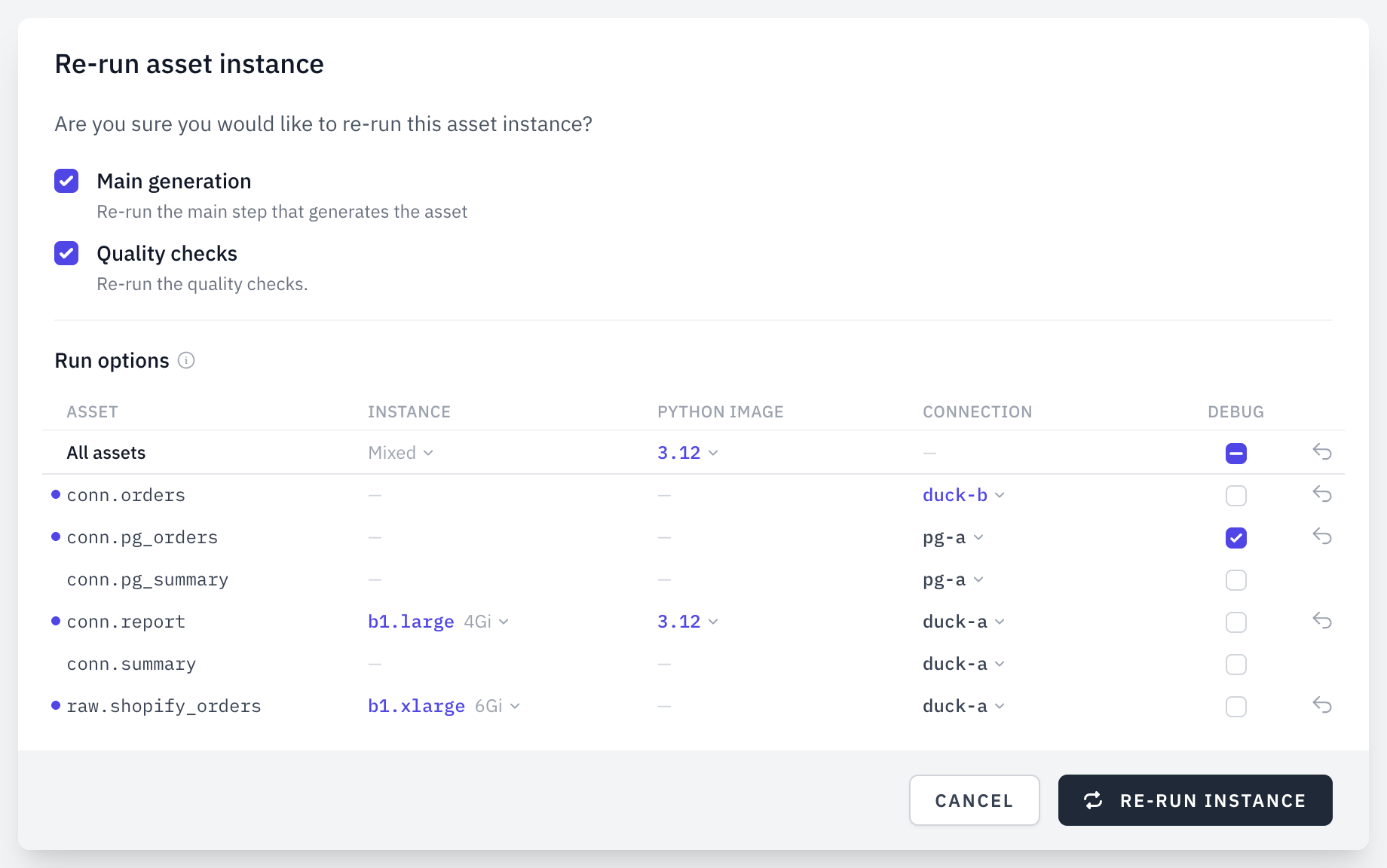
What you can change
- Instance (Python and ingestr assets): give an asset more CPU and memory, for example when it runs out of memory.
- Python version (Python assets): run an asset on anything from 3.9 to 3.13. Check that your packages support it first.
- Connection (assets that use a connection): point an asset at another connection of the same type, like staging instead of production.
- Debug logs (all assets): see more detail about what Bruin runs. Credentials stay masked.
Changed values are highlighted, and you can reset an asset with one click. To change every asset at once, use the All assets row.
Try it
- Open a failed run and select the asset that failed.
- Choose Re-run selected and pick a larger instance under Run options.
- Re-run it. Future runs go back to the asset's own settings.