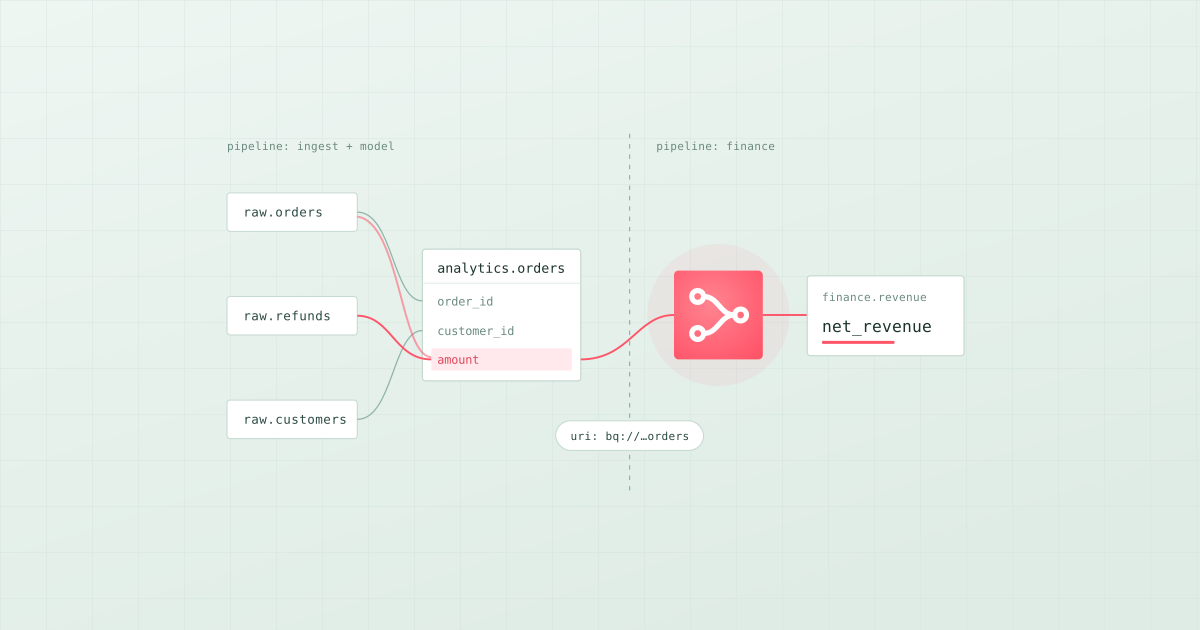
TL;DR: There are three ways to get data lineage without drawing it by hand. Read it from the code (Bruin, dbt and SQLMesh parse the SQL they run), emit it from each job as it runs (OpenLineage integrations for Airflow, Spark and dbt, collected in Marquez or DataHub), or read the warehouse's query history (Unity Catalog, Snowflake, BigQuery, or a catalog that ingests it). Lineage across pipelines needs one more thing: a shared identifier for every table, so the output of one pipeline is recognised as the input of the next. Bruin extracts column-level lineage from SQL automatically and connects pipelines with asset URIs. For Airflow or Spark jobs that run outside Bruin, add OpenLineage.
Hand-drawn lineage is out of date the week after someone draws it. And most teams don't have one pipeline. They have an ingestion tool, a transformation project, some Python jobs and a BI tool, each with part of the graph. The real question is how to get one graph, automatically, that stays current when the code changes.
We build Bruin, so we use it for the examples and say where other tools are the better fit.
Three ways to capture lineage automatically
| Method | What it sees | What it misses | Tools |
|---|---|---|---|
| Read the code (parse each query before it runs) | Every table and column dependency in the project, even for queries that haven't run yet | Code it can't parse, and jobs in other tools | Bruin, dbt, SQLMesh |
| Emit run events (each job reports what it read and wrote) | Every job with an OpenLineage integration, across tools, as it ran | Jobs without an integration | OpenLineage with Marquez, DataHub or OpenMetadata |
| Read query history (parse what the warehouse executed) | Everything that ran in that warehouse | Anything outside it | Unity Catalog, Snowflake, BigQuery, DataHub, OpenMetadata |
Best approach by situation:
- Your pipelines are mostly SQL in one project: read the code. Bruin and dbt both do this.
- You run Airflow and Spark jobs across several tools: OpenLineage events, collected in Marquez or DataHub.
- Everything runs inside one warehouse: start with that warehouse's own lineage, such as Unity Catalog on Databricks.
- Several teams and repositories: one identifier per table, plus one place that shows the whole graph, such as Bruin Cloud, DataHub or OpenMetadata.
Most teams combine two: code parsing for the pipelines they own, and query history or OpenLineage for everything else.
Step 1: Get column-level lineage from the SQL
In Bruin, each table is an asset: a SQL or Python file with a short header. Here is a SQL asset that builds revenue by country from two upstream tables:
/* @bruin
name: analytics.revenue_by_country
type: bq.sql
materialization:
  type: table
depends:
  - analytics.orders
  - analytics.customers
columns:
  - name: country
    type: string
  - name: revenue
    type: float
@bruin */

SELECT c.country, SUM(o.amount) AS revenue
FROM analytics.orders o
JOIN analytics.customers c ON c.customer_id = o.customer_id
WHERE o.status = 'paid'
GROUP BY 1
Bruin extracts the column lineage from the query itself: revenue comes from orders.amount, country from customers.country. Nobody maintains that mapping by hand. If an asset is missing an upstream in depends, one command reads the SQL and adds it:
bruin patch fill-asset-dependencies path/to/pipeline
To see the graph for any asset, upstream and downstream, including indirect dependencies:
bruin lineage --full assets/revenue_by_country.sql
bruin lineage --full -o json assets/revenue_by_country.sql   # for scripts and agents
Because the lineage comes from the files in Git, it changes in the same pull request as the code. There is nothing separate to update.
Step 2: Cover the code that SQL parsing can't see
Parsing has limits. Three places need help:
Python. A Python asset can do anything with a dataframe, so no parser can be sure where each output column came from. In Bruin you declare it once, per column:
columns:
  - name: col1
    type: int
    upstreams:
      - table: xyz
        column: col1
Bruin joins these declarations with the lineage it extracts from SQL, so the graph stays column-level from start to end.
Ingestion. Loads written as ingestr assets are part of the same project, so the graph starts where data enters the warehouse, not at the first model.
Dashboards. Tableau and QuickSight assets in Bruin detect the warehouse tables they read, so the dashboards that depend on a table show up at the end of its lineage.
Step 3: Connect pipelines to each other
Lineage inside one project is the easy part. Across teams, the same table name often exists in several projects, and nothing tells you that orders in one repository is the table another repository reads.
The fix is one identifier per table that every pipeline uses, usually its warehouse address. In Bruin that is the asset's uri:
name: analytics.orders
uri: bigquery://acme-prod.analytics.orders
A pipeline in another repository then depends on that URI instead of a name:
depends:
  - uri: bigquery://acme-prod.analytics.orders
    mode: last
mode controls whether the downstream waits: full waits for the upstream run, last uses the upstream's most recent run when the schedules don't line up, and symbolic only draws the lineage without waiting at all. In Bruin Cloud, Catalog → Lineage shows every pipeline as a node and every cross-pipeline dependency as an edge, and each asset page marks assets from other pipelines or repositories so you can follow them.
Step 4: Add OpenLineage for jobs outside Bruin
Bruin does not emit OpenLineage events today. If you also run Airflow DAGs, Spark jobs or dbt runs outside Bruin, their OpenLineage integrations report what each job read and wrote: the apache-airflow-providers-openlineage package for Airflow, the Spark integration, and the dbt-ol wrapper for dbt. Marquez, the OpenLineage reference implementation, collects the events, and DataHub and OpenMetadata accept them too.
That leaves you with two views: Bruin for the pipelines it runs, and the OpenLineage backend for the rest. If one combined graph matters more than one tool, a catalog such as DataHub or OpenMetadata can merge OpenLineage events with warehouse query history. Use the same table identifiers everywhere and the pieces line up.
Step 5: Keep lineage from going stale
Lineage generated from code stays current as long as the code is the source of truth. A few habits keep it that way:
- Validate on every pull request. Run
bruin validatein CI so a broken dependency fails the build instead of the graph. - Put owners on assets and columns. Lineage answers "what breaks", owners answer "who do I ask". Both live in the same file.
- Check impact before you change a column. Run
bruin lineage --fullon the asset before you rename or drop anything. See what impact analysis for a schema change looks like. - Cover every new tool on day one. Each tool you add without lineage is a gap someone fills by hand later.
Where the other tools fit
- dbt builds lineage from
ref()andsource()inside a dbt project. Column-level lineage is in Catalog (formerly dbt Explorer) on the dbt platform's Enterprise and Enterprise+ plans, and reflectsselectlogic rather than joins or filters. - OpenLineage and Marquez are the open standard and reference backend for run-time lineage. Strongest when you have many Airflow and Spark jobs.
- DataHub and OpenMetadata are open-source catalogs that collect lineage from many sources, down to columns: Snowflake and BigQuery query history, dbt, Airflow and OpenLineage events. Choose one when lineage must span tools you cannot all parse.
- Unity Catalog captures lineage automatically for queries run on Databricks, down to the column level, for tables registered in Unity Catalog.
- Snowflake and BigQuery record lineage themselves. Snowflake's ACCESS_HISTORY view and Snowsight lineage need Enterprise Edition or higher. BigQuery records lineage through Knowledge Catalog (formerly Dataplex Universal Catalog) once the Data Lineage API is on, with column-level lineage for top-level columns and 30 days of history.
- Atlan and Collibra are commercial catalogs for large organisations that need lineage plus governance workflows.
For a full comparison, see the best data lineage and catalog tools in 2026. For why columns matter more than tables, see what column-level lineage is.
Where to start
Pick the pipeline that feeds your most-used report. Move it into a Bruin project or point Bruin at it with bruin import database, run bruin lineage --full on the final table, and see what the graph shows that you didn't know. Then give the tables that other teams read a uri, and connect the next pipeline.
The Bruin CLI is open source. The lineage docs cover every flag.