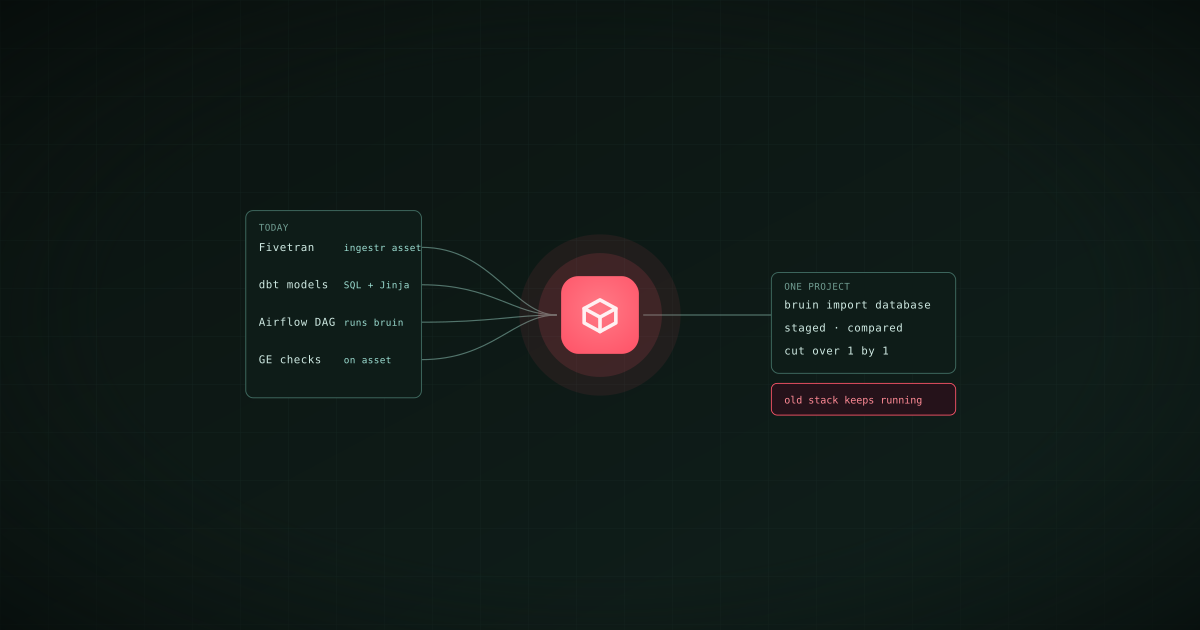
Migrating to Bruin is incremental and tool by tool, not a rewrite. Existing warehouse tables become Bruin assets with one command. dbt models port as files, Jinja included. Fivetran connections map to ingestr loads through a template that reads the Fivetran API and waits for approval before it writes anything. And Bruin runs from inside an existing Airflow DAG, so the scheduler you have today keeps running while you move. This guide is the order to do it in, how long each step takes, and an honest account of what "CLI-first" means for the people on your team who do not live in a terminal.
We build Bruin, so treat the timings as claims to verify on your own stack. They come from the customers named below and from the tooling described, which is all in the public docs.
The principle: coexist first, replace second
Every migration that goes wrong goes wrong the same way: the old system is switched off before the new one is proven. The Bruin migration path is built to avoid that. Each layer of your stack can be replaced independently, and every replacement can run next to the thing it replaces until the numbers match.
| You have | Bruin replaces it with | Runs alongside during migration? |
|---|---|---|
| Fivetran or Airbyte connectors | ingestr assets, one per connection | Yes, connection by connection |
| dbt models and tests | SQL assets with Jinja, column checks | Yes, against the same warehouse |
| Airflow DAGs | The pipeline's own dependency graph and schedule | Yes, Bruin runs as a task inside your DAG |
| Great Expectations or Soda checks | Checks declared on the asset | Yes |
| A BI tool | AI data analyst plus dashboards as code | Yes, most teams keep both |
Step 1: Import what already exists (an afternoon)
Start from the warehouse, not from a blank project. bruin import database reads the tables in a connection and creates an asset definition for each one in the pipeline's assets/ directory:
bruin init empty migration
cd migration
bruin import database --connection snowflake-prod ./
Supported for Snowflake, BigQuery, Postgres, Redshift, Athena, Databricks, DuckDB, ClickHouse, Synapse, SQL Server, and MongoDB. The result is a project that knows every table you have, with columns, ready to carry descriptions, owners, and checks. bruin ai enhance writes the first draft of the descriptions and suggested checks for review. There are also importers for BigQuery scheduled queries, Oracle Data Integrator exports, Tableau, and QuickSight, which cover the transformation logic hidden in those tools.
Step 2: Move the transformations (days, not weeks)
From dbt. Bruin supports Jinja, so a dbt model becomes a Bruin SQL asset by adding the header: name, dependencies, materialization. Tests move into column checks in the same header. bruin validate resolves the dependency graph and tells you what is missing before anything runs.
/* @bruin
name: mart.orders
type: sf.sql
depends: [raw.orders, mart.customers]
materialization:
  type: table
  strategy: merge
columns:
  - name: order_id
    checks:
      - name: not_null
      - name: unique
@bruin */

SELECT ... FROM {{ ref_table }}
Run the Bruin asset into a staging schema, diff it against the dbt output, and cut over when they match. Buluttan made this move and reported pipelines three times faster than their dbt setup and deployments 90% faster. dbt Cloud jobs go away with the models; dbt Core stays installed until the last model is ported, and nothing forces the order.
From SQL in a scheduler or a BI tool. The importers above pull scheduled queries out of BigQuery and the logic out of Tableau and QuickSight. Everything else is a SQL file with a header.
Step 3: Replace the connectors (one connection at a time)
For Fivetran there is a template that does the mapping:
bruin init migration-fivetran fivetran-migration
It reads your Fivetran connections through read-only API calls, records the inventory and any compatibility gaps in a migration plan, maps each connection to an ingestr asset with the matching incremental strategy, and pauses for your approval before any connection test or destination write. Cut over one connection at a time: run the ingestr load into an isolated schema, compare row counts and a checksum with the Fivetran table, then retire the Fivetran sync. The Fivetran to Bruin guide walks a Postgres to BigQuery example end to end; NativeMinds ended up at up to five times lower cost than their Fivetran stack after the move.
For Airbyte, Stitch, or custom scripts, the shape is the same without the template: one ingestr asset per source, staged, compared, cut over.
Step 4: Keep Airflow until you do not need it
You do not have to replace the orchestrator to start. Bruin runs as a task inside an existing Airflow DAG, either a BashOperator that calls bruin run on the worker or a KubernetesPodOperator that runs the official Bruin image, so the DAG that triggers your pipeline today can trigger the Bruin version tomorrow. Once every task in a DAG is a Bruin asset, the DAG is a single bruin run, and the schedule moves to pipeline.yml, run by CI or Bruin Cloud. At that point Airflow has nothing left to orchestrate for that pipeline and can be retired at leisure. The Airflow deployment guide has both operators.
What "CLI-first" actually means
The objection engineers hear about Bruin is that it is CLI-first, and the concern behind it is that everyone will have to learn a terminal. They will not.
- Engineers use the CLI, and it is one binary with the same commands locally, in CI, and in production. That is the property that makes review, rollback, and agents possible.
- Engineers who prefer a UI use the VS Code extension, which renders the pipeline, lineage, query results, and runs visually, and Bruin Cloud, which is the web UI for schedules, runs, the catalog, and lineage.
- Analysts and business users never see the CLI. They ask the AI data analyst in Slack, Microsoft Teams, Google Chat, WhatsApp, Discord, Telegram, email, or the browser, and build dashboards from a prompt.
CLI-first means the pipeline is code. It does not mean every user types commands.
How long it takes
The customers who have published their numbers: Fabrikatör, one tool replacing four for orchestration, validation, CI, and observability, with a new engineer productive in about a week. ProphetX, one person running the entire data and analytics function, with a new production data source going from a month to a day. SCG, three tools instead of the usual six or seven, and a custom connector built by Bruin in under a week. Buluttan, three times faster than dbt and 90% faster deployments.
The honest general answer: a first pipeline in production in days, a full stack in weeks, and the old tools running alongside until you are sure. For what you own at the end of it, and what you can take with you if you ever leave, see does Bruin lock you in.