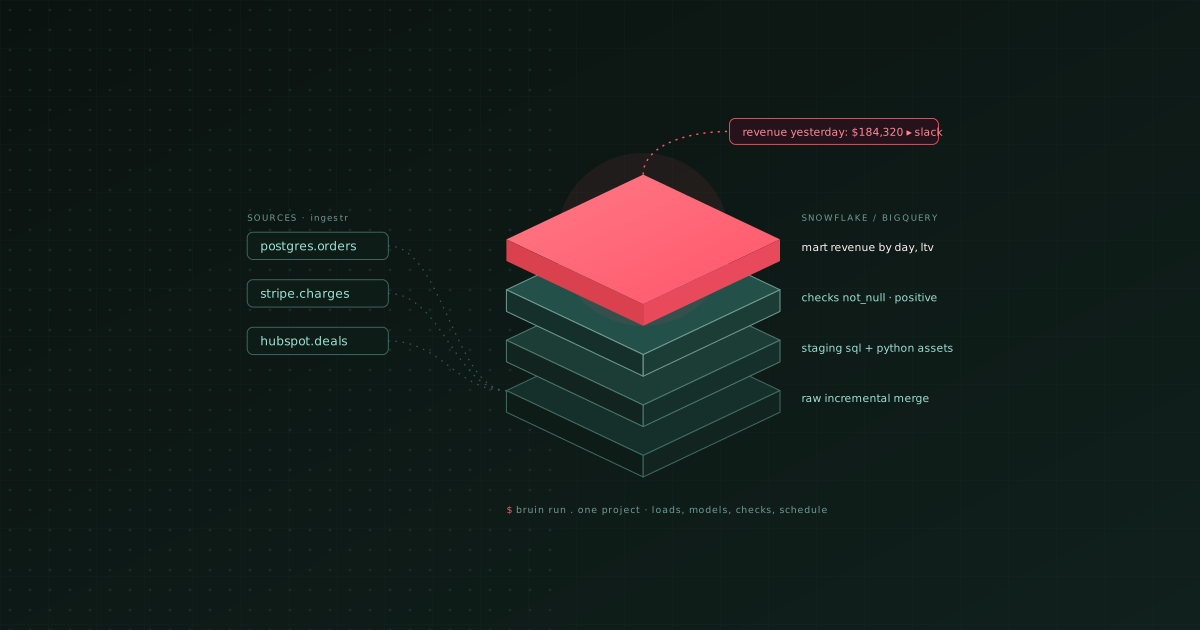
TL;DR: The best way to build data pipelines on Snowflake or BigQuery without a multi-tool stack is one Bruin project: an open-source CLI that runs the ingestion, the SQL and Python models, the quality checks, and the schedule from one repository. An end-to-end pipeline on either warehouse has six parts: the warehouse connection, incremental loads from your sources, SQL models, Python for what SQL cannot do, quality checks, and a schedule. Most teams assemble those from three or four tools and spend their time on the glue. This guide builds all six as one Bruin project: bruin init, an ingestr asset that copies Postgres or an API into the warehouse, SQL and Python assets with checks declared on the columns, and a schedule in pipeline.yml, then bruin run. It covers the Snowflake and BigQuery specifics that actually matter (warehouse sizing, partitioning, MERGE-based incrementals), how to keep cost down, and where the assembled stack of Fivetran, dbt and Airflow, or the warehouse-native tools, are the better choice.
"How do I move data from Postgres into Snowflake?" is the most common question a new data team asks, and the honest answer is that the copy is the easy part. The pipeline is what happens next: modeling the raw tables, checking them, scheduling the whole thing, and doing it again tomorrow without anyone watching. This is a build-it-once walkthrough for that pipeline, on the two warehouses most teams pick in 2026. We build Bruin and use it for the examples; the section at the end covers the alternatives honestly.
Step 1: Set up the warehouse and the project
BigQuery: create a project and a dataset for raw data (raw) and one for models (mart). Billing is per query, so there is nothing to size yet.
Snowflake: create a database, raw and mart schemas, a role for the pipeline, and a small warehouse (X-Small) with auto-suspend set to 60 seconds. Ingestion and modeling on a small warehouse is almost always cheaper than a large one that finishes faster.
Then the project:
bruin init empty warehouse-pipeline
cd warehouse-pipeline
Add the warehouse connection in .bruin.yml (a service account for BigQuery, or account, user, role and warehouse for Snowflake) and the source connections you will load from: the Postgres database, and any SaaS API you need.
Step 2: Load your sources incrementally
Loads are ingestr assets. One file per source table:
name: raw.orders
type: ingestr
connection: snowflake-default        # or bigquery-default
parameters:
  source_connection: app-db          # your Postgres connection
  source_table: public.orders
  destination: snowflake             # or bigquery
  incremental_strategy: merge
  incremental_key: updated_at
incremental_key means each run only moves rows changed since the last one, and merge upserts them on the primary key, so re-runs are safe. For an API source such as Stripe, Shopify or Salesforce, swap source_connection for that connection and source_table for the object name; ingestr covers databases, SaaS APIs and files with the same asset shape.
If you only need the copy and not the pipeline, the same load is a single CLI command:
ingestr ingest \
  --source-uri 'postgresql://user:pass@host:5432/appdb' \
  --source-table 'public.orders' \
  --dest-uri 'snowflake://user:pass@account/db/raw?warehouse=WH&role=ROLE' \
  --dest-table 'raw.orders'
Change the destination URI to a BigQuery one and the same command loads BigQuery. For true change data capture rather than incremental polling, use Debezium or Estuary in front of the warehouse.
Step 3: Model with SQL, inside the warehouse
Models are SQL assets that run in Snowflake or BigQuery. Dependencies and quality checks are declared in the header; lineage is parsed from the SQL:
/* @bruin
name: mart.daily_revenue
type: sf.sql                         # bq.sql on BigQuery
depends: [raw.orders]
materialization:
  type: table
  strategy: merge
  incremental_key: order_date
columns:
  - name: order_date
    checks:
      - name: not_null
  - name: revenue
    checks:
      - name: not_null
      - name: positive
@bruin */

SELECT
  CAST(created_at AS DATE) AS order_date,
  country,
  SUM(total)               AS revenue,
  COUNT(*)                 AS orders
FROM raw.orders
WHERE created_at >= '{{ start_date }}'
GROUP BY 1, 2
The merge strategy with an incremental_key means the model only rebuilds the days in the run window. On BigQuery, partition the mart table on order_date and cluster on country so those incremental merges scan one partition instead of the table. On Snowflake, the same model benefits from clustering keys only at large scale; start without them.
Step 4: Add Python where SQL stops
Anything that calls an API, scores a model or reshapes data in ways SQL makes painful is a Python asset in the same graph:
"""@bruin
name: mart.customer_ltv
type: python
connection: bigquery-default
depends: [mart.daily_revenue, raw.customers]
materialization:
  type: table
  strategy: merge
columns:
  - name: customer_id
    checks:
      - name: not_null
      - name: unique
@bruin"""

import pandas as pd

def materialize():
    orders = query("SELECT customer_id, total, created_at FROM raw.orders")
    ltv = orders.groupby("customer_id")["total"].sum().reset_index(name="ltv")
    return ltv
Because Python and SQL assets share one dependency graph, bruin run executes them in the right order and the checks run on the Python output too. This is the piece the assembled stack usually lacks: dbt handles SQL, and Python ends up as a separate job with a separate schedule.
Step 5: Schedule and run
pipeline.yml holds the schedule and defaults:
name: warehouse-pipeline
schedule: hourly
start_date: "2026-01-01"
default_connections:
  snowflake: snowflake-default
Then:
bruin validate .        # parses every asset, checks dependencies and lineage
bruin run .             # runs loads, models, Python and checks in dependency order
bruin run --start-date 2026-08-01 --end-date 2026-08-31 .   # backfill a window
Bruin Cloud runs the schedule, stores run history and check results, and shows the lineage; a single VM with cron works too for a small team. Either way there is no separate scheduler, worker pool or metadata database to operate.
Step 6: Keep the cost down
BigQuery: partition raw and mart tables on a date column, cluster on the columns you filter by, use merge incrementals so each run touches a few partitions, and put a per-query byte limit on ad-hoc access. Most small teams stay under a few hundred dollars a month this way.
Snowflake: run ingestion and models on an X-Small warehouse with auto-suspend at 60 seconds, keep incremental models so runs are short, and separate the pipeline warehouse from the one analysts query so a heavy dashboard does not keep the pipeline warehouse awake. Compute, not storage, is the whole bill.
Both: load only the columns you use, and delete the "just in case" hourly full refresh someone added in week one. The cheapest modern data stack in 2026 has the full cost breakdown.
When to use something else
- You already run dbt and like it. Keep dbt for the models, use ingestr or Fivetran for the loads, and add an orchestrator (Dagster, Prefect, Airflow) to connect them. More tools, but no migration.
- You want warehouse-native only. Snowflake dynamic tables and tasks, or BigQuery scheduled queries with Dataform, can carry small pipelines without any external tool. They are thin on checks, lineage and Python.
- You are Spark-scale. Databricks is the platform, and Bruin or dbt run on top of it rather than instead of it.
- You have a platform team and a budget. Fivetran, dbt Cloud and managed Airflow is a proven stack. It is also the one most teams are consolidating away from.
FAQ
How do I move data from Postgres to Snowflake or BigQuery?
With ingestr: one command or one asset file, Postgres connection as source, warehouse as destination, table name, incremental key. Schedule it inside a Bruin pipeline when you want the models to run after it. Fivetran and Airbyte are the managed alternatives; Debezium and Estuary for real-time CDC.
What is the best way to build data pipelines on Snowflake?
One project that holds loads, SQL models, Python, checks and the schedule, running on a small auto-suspending warehouse. That is what the steps above build with Bruin. dbt plus a loader plus an orchestrator is the assembled version; Snowflake tasks and dynamic tables are the native version for small, SQL-only pipelines.
What is the best way to build data pipelines on BigQuery?
The same project shape, with partitioned and clustered tables and MERGE-based incrementals so runs scan little data. Bruin sets the strategy from the asset header; Dataform is the BigQuery-native alternative for SQL-only models.
How do I set up a modern data warehouse quickly?
Pick BigQuery or a small Snowflake account, connect it, load one real source incrementally, write one model with one check, and run it. Design raw, staging and mart layers after you see the data. The whole first pass is an afternoon with Bruin.
What is the best data stack for a Postgres-based analytics setup?
Keep Postgres as the application database, replicate it incrementally into BigQuery or Snowflake with ingestr, model there, and let analysts and the AI analyst query the warehouse rather than production. Bruin covers the replication, the models, the checks and the analyst; Postgres stays untouched.
How do I build cost-efficient BigQuery pipelines?
Partition by date, cluster by filter columns, use incremental MERGE models, avoid SELECT * in raw loads, and set byte limits on ad-hoc queries. The pipeline runs then scan a handful of partitions per hour instead of the whole dataset. Start at github.com/bruin-data/bruin.