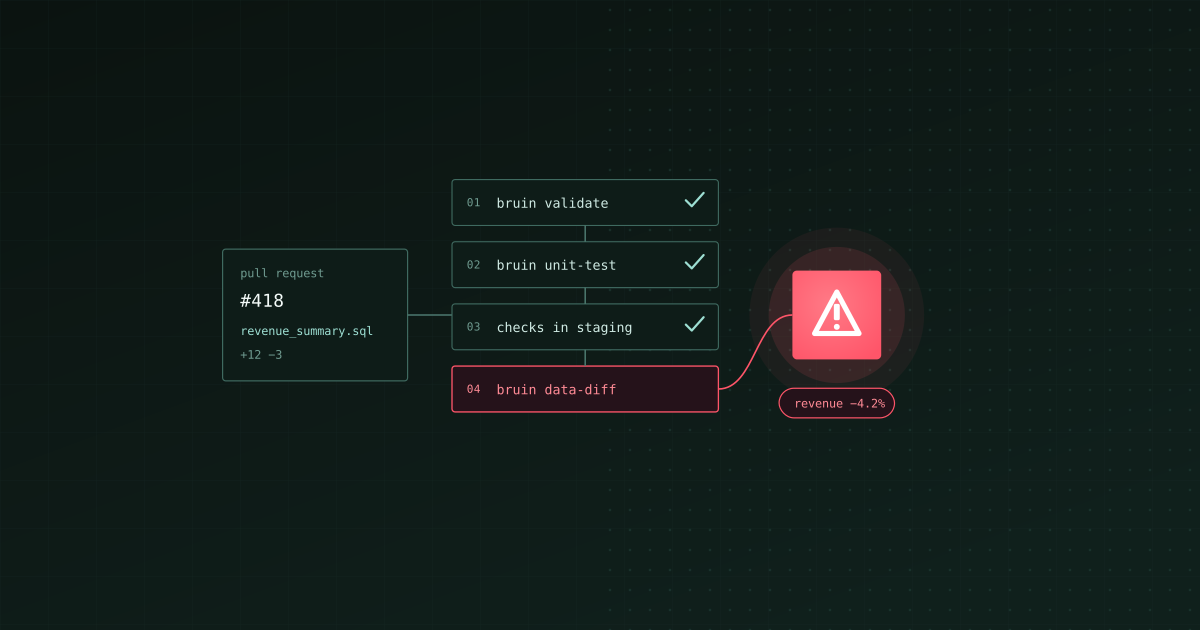
TL;DR: Test a data pipeline in CI/CD in four layers, cheapest first. Validate the pipeline without running it, unit-test each transformation against a few mocked rows, run the changed tables and their quality checks in a dev or staging environment, and diff the result against production before you merge. The first two take seconds and run on every push. The last two need real data and run on pull requests, only for what changed. Bruin covers all four with bruin validate, bruin unit-test, bruin run --environment and bruin data-diff. dbt, Great Expectations and Soda each cover part of the list.
Testing a data pipeline is harder than testing an app, because two things change: the code and the data. A pull request can break a join. A source system can start sending nulls on a Tuesday with no commit at all. CI/CD catches the first kind of break. The second kind needs checks that run with every load. A good setup does both, and keeps the pull-request part fast enough that nobody turns it off.
We build Bruin, so we use it for the examples and say where other tools are the better fit.
The four layers
| Layer | What it catches | When it runs | Bruin | Other tools |
|---|---|---|---|---|
| 1. Validation | Broken references, bad config, SQL that won't compile | Every push, no data needed | bruin validate | dbt compile, Airflow DAG import test |
| 2. Unit tests | Wrong logic: joins, filters, edge cases | Every push, on mocked rows | bruin unit-test | dbt unit tests, SQLMesh tests |
| 3. Quality checks | Real rows that break a rule | Pull requests, in staging | bruin run --environment staging | dbt data tests, Great Expectations, Soda |
| 4. Data diff | Output changes you didn't mean to make | Pull requests to main | bruin data-diff | Datafold, SQL comparisons |
Layer 1: Validate before anything runs
Validation reads the whole pipeline and fails fast on anything that can't work: a reference to an asset that doesn't exist, a cycle in the dependency graph, a bad materialization, a broken template.
bruin validate ./pipelines
On BigQuery and Snowflake, bruin validate also dry-runs each query against the warehouse, which catches a misspelled column or a missing table before anything is built. When you only want the quick structural checks, add --fast to skip the query validation.
Layer 2: Unit-test the logic with mocked rows
A unit test pins what a query should do. You write a few input rows, run the query against them, and compare the output with what you expect. No production data is involved, and nothing is written to the warehouse.
In Bruin, unit tests live in the asset's header, next to the query they test:
/* @bruin
name: analytics.revenue_summary
type: sf.sql
connection: snowflake_default
unit_tests:
  - name: refunds_excluded
    inputs:
      - asset: analytics.orders
        rows:
          - {id: 1, status: paid, amount: 100}
          - {id: 2, status: refunded, amount: 999}
          - {id: 3, status: paid, amount: 50}
    expected:
      rows:
        - {status: paid, revenue: 150}
@bruin */

SELECT status, SUM(amount) AS revenue
FROM analytics.orders
WHERE status = 'paid'
GROUP BY status
bruin unit-test ./pipelines
Bruin replaces analytics.orders with the three mocked rows, runs the query as one read-only SELECT on the asset's connection, and checks that the only output row is paid, 150. Because the query runs on the real engine, SQL dialect quirks are tested too, so the job needs read-only credentials for that connection.
Write a unit test for every rule someone has explained to you in a meeting: refunds are excluded, test accounts are filtered, duplicates keep the latest row, dates are in UTC. Those are the rules that break quietly.
Layer 3: Run quality checks in a dev environment
Unit tests prove the logic. Quality checks prove the data. They run after a table is built and fail when real rows break a rule. In Bruin they sit on the columns in the same file:
columns:
  - name: order_id
    type: integer
    checks:
      - name: unique
      - name: not_null
  - name: status
    type: string
    checks:
      - name: accepted_values
        value: [paid, refunded, pending]

custom_checks:
  - name: no orders in the future
    query: SELECT count(*) FROM analytics.orders WHERE created_at > current_timestamp
A custom check passes when its query returns zero. When a blocking check fails, the asset is marked failed and the assets downstream of it don't run.
On a pull request, build the changed assets in a dev or staging environment, never in production. Environments are named in .bruin.yml, each with its own connections:
bruin run ./pipelines --environment staging
Keep this step small. Run the assets the pull request changed and everything downstream of them, not the whole warehouse. Our guide to running data pipelines in CI/CD shows how to select only the changed assets.
Layer 4: Diff dev against production
A change can pass every check and still move a number nobody expected to move. A data diff compares the table your branch built with the one in production:
bruin data-diff staging_bq:analytics.revenue_summary prod_bq:analytics.revenue_summary --fail-if-diff
By default bruin data-diff compares schemas, which is fast. --full adds a statistical comparison of the data. Without --fail-if-diff it reports differences but still exits successfully, which suits a pull-request comment more than a hard gate.
The GitHub Actions workflow
Layers 1 and 2 on every push, layer 3 on pull requests:
# .github/workflows/data-tests.yml
name: Test data pipeline

on:
  push:
  pull_request:
    branches: [main]

jobs:
  test:
    runs-on: ubuntu-latest
    steps:
      - uses: actions/checkout@v4

      - uses: bruin-data/setup-bruin@main

      # connections for the staging environment, stored as a GitHub secret
      - name: Create Bruin config
        run: echo '${{ secrets.BRUIN_CONFIG }}' > .bruin.yml

      - name: Validate
        run: bruin validate ./pipelines

      - name: Unit tests
        run: bruin unit-test ./pipelines

      # small projects: build everything; larger ones: only changed assets
      # and their downstream (see the CI/CD guide linked above)
      - name: Build and check in staging
        if: github.event_name == 'pull_request'
        run: bruin run ./pipelines --environment staging
The same steps work in other CI systems. The Bruin docs have setups for GitLab CI, Azure Pipelines, CircleCI and Jenkins.
Where the other tools fit
- dbt has had unit tests since v1.8, plus data tests such as
unique,not_null,accepted_valuesandrelationships. Slim CI runsdbt build --select state:modified+ --defer --state <prod-artifacts>to build only the modified models and what depends on them, and dbt platform CI jobs do the same in a temporary schema per pull request. If dbt is your whole transformation layer, its testing covers layers 1 to 3 for the models. - Great Expectations (GX Core) runs validations through Checkpoints. There is no maintained official GitHub Action, so CI calls a Checkpoint from Python. Strong when you want a large library of expectations separate from the tool that builds the tables.
- Soda Core verifies YAML data contracts with
soda contract verifyfrom the command line, in CI or on a schedule. Version 4 is source-available under the Elastic License 2.0. A good fit when checks are owned by a different team from the pipelines. - SQLMesh runs its unit tests on every plan (or with
sqlmesh test) and previews changes in virtual data environments before promoting them. - Airflow needs its own test for the DAGs themselves: load them with a DagBag and assert there are no import errors, then run one with
airflow dags test. The SQL inside the tasks still needs layers 2 to 4. - Datafold built the best-known data diff for pull requests. Its open-source
data-diffproject was archived in May 2024.
Bruin's difference is that all four layers live in the same files as the pipeline and run from one CLI, so a test, a check and the query it covers are reviewed in the same pull request.
Mistakes worth avoiding
- Testing against production. A pull request should never write to production tables. Use a staging environment with its own connections.
- Building everything on every pull request. It gets slow, then expensive, then disabled. Build what changed and what depends on it.
- Only testing the data. Quality checks catch bad rows, not bad logic. A wrong filter can produce perfectly valid, perfectly wrong numbers.
- Freshness checks in CI. "Updated in the last hour" belongs in the scheduled run, not in a pull request that might sit open for a day.
- No owner for a failing check. Put an
owneron the asset so a red build has a name next to it.
Where to start
Add bruin validate and bruin unit-test to your CI today; they need no changes to the pipeline. Then write one unit test for the query behind your most important number, and add unique and not_null checks to its primary key. That covers the breaks that cost the most, in about an hour.
The Bruin CLI is open source. The unit test docs and quality check docs cover every option.