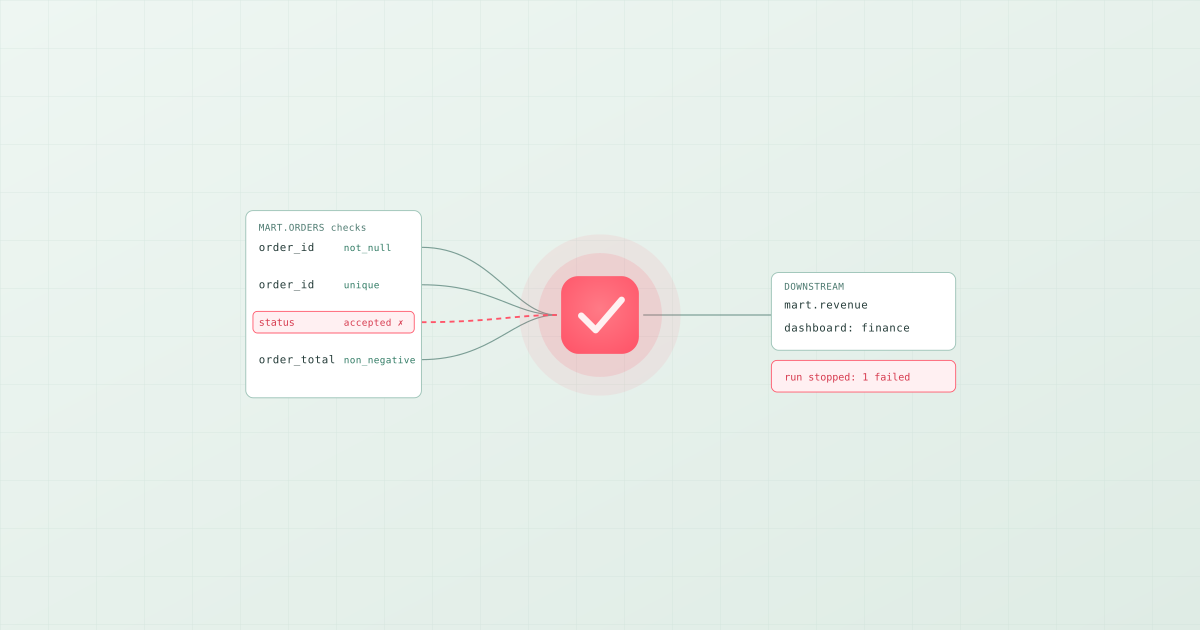
A data quality check is a rule that runs against a table, or a column in it, and fails when the data breaks the rule. "No nulls in order_id", "every status is one of four values", "the newest row is less than six hours old". The check either passes or it fails, and what happens on failure is the design decision that separates a useful check from a dashboard nobody reads: a blocking check stops the pipeline, so bad data never reaches the tables downstream. In Bruin, checks are declared on the column inside the asset that produces it and block by default; dbt tests, Great Expectations, and Soda run the same kinds of rules as a separate step.
The types of data quality check
Most checks fall into six families. The names below are Bruin's built-in check names; every framework has an equivalent.
| Family | What it asserts | Built-in check | Catches |
|---|---|---|---|
| Completeness | The column has a value | not_null | A source that started sending empty fields |
| Uniqueness | No duplicates | unique | A load that ran twice, a join that fanned out |
| Validity | Values are from an allowed set or shape | accepted_values, pattern | Upstream schema drift, a new status nobody mapped |
| Range | Numbers and dates sit inside bounds | positive, non_negative, min, max | Unit errors, currency mix-ups, future dates |
| Referential integrity | Every foreign key points at a real row | relationships | Orphaned facts after a dimension reload |
| Freshness and volume | The table was updated recently and has the expected rows | custom SQL check | The pipeline that silently stopped |
The first two families on a primary key, plus a freshness check on the load timestamp, catch most of the incidents a data team ever gets paged for.
Where the check runs matters more than which checks you write
There are two places a check can live. It can sit beside the pipeline, as a separate suite of expectations or a YAML scan file, run by a step the orchestrator triggers between load and transform. Or it can sit inside the pipeline, declared on the asset that produces the table and executed as part of building it.
Beside the pipeline is how Great Expectations and Soda Core work, and it suits a platform team that wants one central library of rules over many producers. The cost is drift: rename a column in the transformation and the expectation that references it is now wrong in a different repository, and nobody finds out until it fails for the wrong reason.
Inside the pipeline is how Bruin and dbt tests work. The check is in the same file as the SQL that produces the column, so rename the column and the check moves with it, delete the asset and the check goes with it. There is nothing to keep in sync.
What a check looks like in practice
In Bruin the checks are part of the asset header, in the SQL or Python file that builds the table:
/* @bruin
name: mart.orders
type: sf.sql
depends: [raw.orders]
materialization:
  type: table
columns:
  - name: order_id
    type: integer
    primary_key: true
    checks:
      - name: not_null
      - name: unique
  - name: status
    type: string
    checks:
      - name: accepted_values
        value: [placed, paid, shipped, refunded]
  - name: order_total
    type: float
    checks:
      - name: non_negative
custom_checks:
  - name: loaded in the last 6 hours
    query: SELECT max(updated_at) > current_timestamp - interval '6 hours' FROM mart.orders
    value: 1
@bruin */

SELECT order_id, status, order_total, updated_at FROM raw.orders
bruin run builds the table and runs the checks in the same step. Every check is blocking by default, so a failure stops the downstream assets; a check you only want to observe gets blocking: false. The custom_checks block takes any SQL that returns a value to compare, which is how freshness, row counts, and business rules such as "no order total above a limit without a manager flag" are expressed.
The dbt equivalent is a tests: list under the column in the model's YAML, run by dbt test or dbt build. Great Expectations expresses the same rules as expectations in a suite and runs them from a checkpoint. Soda writes them as checks for orders: with lines like missing_count(order_id) = 0.
When a check fails
A failed check should do three things: stop the assets that depend on the table, tell a person in the channel they already watch, and leave enough context to diagnose the cause. Bruin does the first two from the pipeline definition, with notifications routed to Slack or Microsoft Teams, and the third comes from lineage, which shows which upstream asset fed the bad rows. The alternative, a check that logs a warning and lets the pipeline continue, is how a wrong number ends up in a board deck.
Checks are the start of data quality, not the whole of it
Checks are a gate: they catch what you thought to write a rule for. They do not notice that a table's row count is 40% below its usual Tuesday, because no rule said what Tuesday usually looks like. That is the job of an observability tool such as Elementary, Monte Carlo, or Anomalo, and most teams end up with both a gate and a monitor once they have more tables than rules. For the tool-by-tool view see the best data quality tools in 2026, and for the full strategy including data contracts, data quality and testing strategies for modern pipelines.