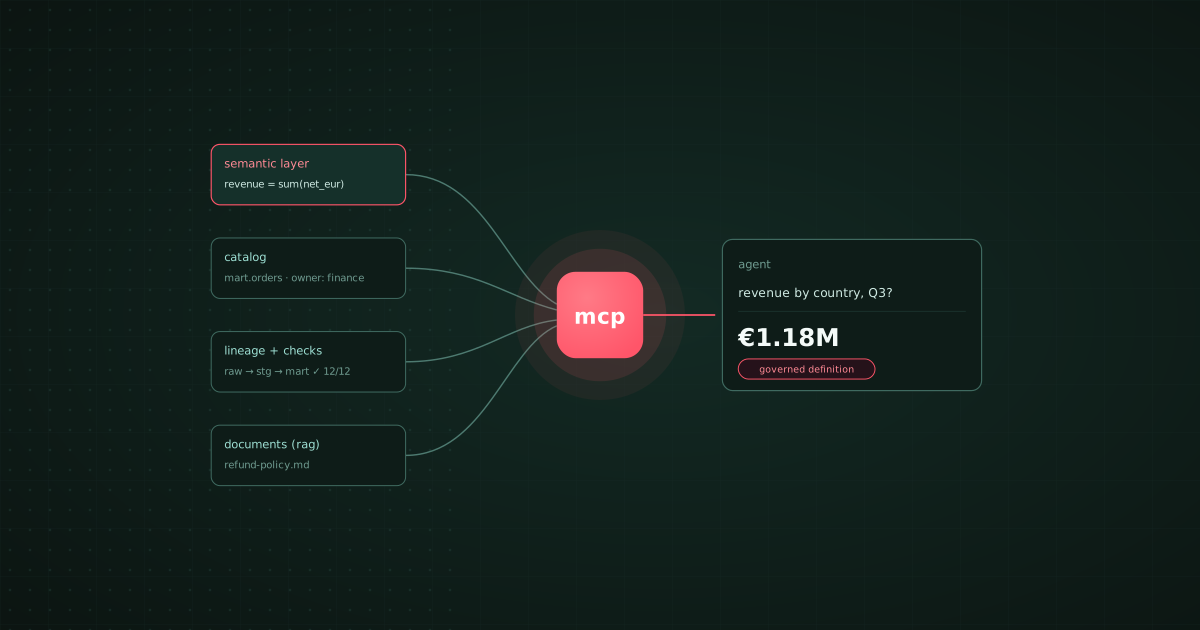
TL;DR: To give AI agents context about your company data, give them four things: governed metric definitions in a semantic layer, documented and owned tables, column-level lineage with quality-check results, and retrieval over documents for the prose. Then let them reach it through an MCP server with read-only, scoped credentials. Bruin puts the first three in one open-source project and serves them with bruin mcp to Claude Code, Cursor, Codex, or Bruin's AI data analyst. dbt Semantic Layer and Cube cover the definitions, and Atlan and DataHub cover the catalog, if your stack is already split that way. RAG on its own is the wrong tool for numbers.
An agent that can write SQL is not an agent that knows your business. Point a capable model at a warehouse and it will find a table called orders, sum a column called amount, and hand back a revenue figure that finance has never seen. The SQL is fine. The context is missing: refunds are excluded, test accounts are filtered, and amounts are in cents for one source and euros for another. None of that is in the schema.
Context engineering is the work of putting that knowledge where an agent can find it. This guide covers what the agent needs, where each piece should live, and how to wire it up. We build Bruin, so we use it for the examples and say where other tools are the better fit.
The four kinds of context an agent needs
| Context | What it answers | Where it should live | Tools |
|---|---|---|---|
| Business definitions | What "revenue", "active user" and "churned" mean | A semantic layer, reviewed in git | Bruin, dbt Semantic Layer, Cube |
| Table and column meaning | Which table to use, what each column holds, who owns it | A catalog generated from the pipeline | Bruin, Atlan, DataHub, Unity Catalog |
| Lineage and quality state | Where a number came from and whether today's run passed its checks | The pipeline itself | Bruin, dbt, OpenMetadata |
| Unstructured knowledge | Policies, playbooks, past decisions, ticket history | A retrieval index (RAG) | OpenAI vector stores, Amazon Bedrock Knowledge Bases |
Best tool by need:
- Business definitions an agent can query: Bruin, dbt Semantic Layer, or Cube.
- Definitions, catalog, lineage and checks in one open-source project: Bruin.
- An existing enterprise catalog to expose to agents: Atlan or DataHub.
- Everything inside one warehouse: Databricks Unity Catalog with Genie, or Snowflake Horizon with Cortex Analyst.
- Documents and policies: a RAG index such as OpenAI vector stores or Bedrock Knowledge Bases.
Most wrong answers come from skipping the first row. An agent with a perfect catalog and no definitions still has to guess what the business means by its own words.
RAG vs MCP vs a semantic layer
These get compared as if they were alternatives. They are three different layers.
RAG (retrieval-augmented generation) finds passages of text that look relevant and pastes them into the prompt. It is the right tool for a pricing policy, an onboarding wiki or last quarter's board memo. It is the wrong tool for a number: a retrieved document that says revenue was 1.2M is a snapshot, and the agent has no way to know it is stale.
MCP (Model Context Protocol) lets an agent call tools instead of reading text. Through an MCP server an agent can list tables, read a column's description and owner, follow lineage, and run a query. The answer is live, and the server decides what the agent may touch. Bruin, dbt, Snowflake, Databricks, Atlan and DataHub all ship MCP servers; see which data tools have a built-in MCP server.
A semantic layer is what the agent should query once it is connected. Instead of writing SQL against raw tables, the agent asks for revenue by country for the completed segment, and the layer compiles the governed definition to SQL. That is the difference between an agent that is usually right and one that matches finance.
The working setup uses all three: MCP as the connection, the semantic layer as the source of numbers, and RAG for the prose around them.
How to set it up, in five steps
- Map the tables.
bruin import databasereads your warehouse schema into version-controlled asset files, one per table, so the agent has a list of what exists. - Document them.
bruin ai enhancedrafts descriptions for every table and column, proposes quality checks, and leaves the result in files for a human to review. Assign an owner to each table people ask about. The walkthrough is in how to build an AI context layer for your data warehouse. - Declare the business definitions. Put metrics, dimensions, segments and safe joins in a
semantic/folder at the repository root. Each metric carries its SQL expression and a one-line description. Review changes in pull requests like any other code. - Keep lineage and quality state attached. Column-level lineage comes from the pipeline code, and checks declared on each column run with every pipeline run, so an agent can say "this figure comes from a run whose checks passed" or refuse to answer from a table whose checks failed. The full pattern is in how to build a context layer for AI-ready data pipelines.
- Connect the agent. Run
bruin mcpand register it with Claude Code, Cursor or Codex, or use Bruin's AI data analyst, which reads the same definitions in Slack, Microsoft Teams, Google Chat, WhatsApp, Discord, Telegram, email and the browser.bruin ai skills allwrites anAGENTS.mdthat tells a coding agent where each kind of context lives.
# semantic/orders.yml
schema: v1
name: orders
source:
  table: mart.orders
metrics:
  - name: revenue
    description: Net revenue after refunds, in EUR.
    expression: sum(case when status != 'refunded' then order_total_eur else 0 end)
segments:
  - name: completed
    filter: "status in ('paid', 'shipped')"
Guardrails that keep agent answers trustworthy
- Read-only by default. Give the agent a role that can read the modelled layer and the semantic definitions, not raw tables and not write access. Most hallucinated joins come from raw access.
- Credentials stay out of the model. With an MCP server the agent calls a tool and the server holds the connection, so secrets never enter the prompt. In Bruin they stay in
.bruin.yml. - One source of truth per fact. If the glossary says one thing and a README says another, the agent picks one at random. Keep each definition in exactly one place and reference it everywhere else.
- Definitions change through review. A metric that changes without a pull request is a metric nobody trusts, human or agent.
- Show the work. Prefer agents that return the query and the definition they used, so a person can check an answer before acting on it.
Where the other tools fit
dbt Semantic Layer is the natural choice when your transformations already live in dbt: definitions sit next to the models, and dbt's MCP server exposes them. Cube suits teams that want a headless semantic layer serving applications and embedded analytics as well as agents. Atlan and DataHub are strong when a large organisation already runs a catalog and wants agents to search it. Databricks and Snowflake are the shortest path when every table lives in one of them. Bruin is the fit when you want the definitions, catalog, lineage, quality checks and the pipeline that builds the tables in one open-source project, without a separate tool for each.
For a comparison of the definition layer specifically, see the best semantic layer tools. For what the agent then does with all this context, see what an AI data analyst is.