PostHog Product Analytics to BigQuery
At a glance
- Loads your PostHog events, people, and feature flags into BigQuery
- Cleans them into a tidy staging layer that is easy to query
- Merges each visitor's many IDs into one real person
- Groups events into sessions with duration, bounce, and conversions
- Builds four reports at the account and user-segment level
- Skips duplicate rows, so re-running a day stays correct
- Comes with a ready-made dashboard on top of the reports
- Builds the foundational product-analytics models and context an AI agent can analyze and act on
posthog-bigquery turns raw PostHog product analytics into warehouse-ready account intelligence in BigQuery.
It lands events, persons, and feature_flags in BigQuery, models them into a clean staging layer, and builds four reports — two at account grain, two segmented — with a dashboard on top. 13 assets across three layers.
It complements the PostHog UI rather than replacing it — see how this differs from PostHog out of the box.
Features
- Identity resolution. PostHog merges anonymous visitors into identified people over time, so one person accumulates several distinct IDs. The staging layer exposes
distinct_idsas anARRAY<STRING>so every event resolves to one person. - Safe re-runs. The raw events table is append-only, so re-running a day duplicates rows.
posthog_stage.eventskeeps the most recently loaded copy of each event id, making backfills idempotent. - Sessionization. Duration, depth, entry/exit page, bounce, and conversion per session.
- Retroactive account rollup. Accounts are derived in SQL from the
companyproperty on the person profile, so PostHog's$groupsnever has to have been instrumented. It does still requirecompanyandplanon your person profiles — see Adapt this to your project. - Two tunable scores.
engagement_scoreandpql_score, both documented inline in the SQL with their weights spelled out. - One place to name your events. Which events count as product work, as a conversion, as an upgrade, or as revenue is set by four pipeline variables, not scattered through the SQL.
- Expansion and churn signals. Free/pro accounts using the product like enterprise, and paying accounts whose usage is collapsing.
- Typed schemas with quality checks. Every column is declared and described;
metadata_pushsends those descriptions to BigQuery. - A DAC dashboard over the reports layer, filterable by plan and date range.
Project structure
posthog-bigquery/
├── pipeline.yml
├── README.md
├── macros/
│   └── posthog.sql
├── dashboards/
│   └── posthog-product-analytics.yml
└── assets/
    ├── posthog_raw/
    │   ├── events.asset.yml
    │   ├── persons.asset.yml
    │   └── feature_flags.asset.yml
    ├── posthog_stage/
    │   ├── events.sql
    │   ├── persons.sql
    │   ├── person_distinct_ids.sql
    │   ├── accounts.sql
    │   ├── sessions.sql
    │   └── feature_flag_exposures.sql
    └── posthog_reports/
        ├── account_engagement_monthly.sql
        ├── product_qualified_accounts.sql
        ├── feature_adoption_by_segment.sql
        └── weekly_retention_cohorts.sql
What it creates
The posthog_raw dataset contains three tables, loaded by ingestr through the shared posthog-default connection with BigQuery as the destination:
| Asset | Source table | How it loads |
|---|---|---|
posthog_raw.events | events | Appends each run's window, filtered on timestamp |
posthog_raw.persons | persons | Merges on id, tracked by last_seen_at |
posthog_raw.feature_flags | feature_flags | Merges on id, tracked by updated_at |
The PostHog source handles incrementality itself, so the assets do not declare a materialization block. Each table uses the primary key, incremental key, and strategy that the source defines — see Available Source Tables for the full list, including cohorts, annotations, event_definitions, and the property_definitions:* tables you can add the same way.
Each asset declares its column schema so the columns, descriptions, and quality checks are pinned in BigQuery rather than inferred from whatever a run happens to return. metadata_push is on in pipeline.yml, so those descriptions are pushed to the BigQuery table and column metadata.
Backfill
eventsone day at a time. A wider window silently returns partial data with no sign anything is missing, so backfilling multiple days at once is the single biggest way to load wrong data (why, with measurements).
Staging: posthog_stage
Six models that make the raw payloads usable. Everything downstream reads these, never posthog_raw directly.
| Asset | What it does |
|---|---|
posthog_stage.events | One row per event, deduplicated on id, with the common properties keys lifted into typed columns. Partitioned on event_date. |
posthog_stage.persons | One row per person with identify attributes as typed columns, and distinct_ids as an ARRAY<STRING> so events resolve to a single person after identity merges. |
posthog_stage.person_distinct_ids | The distinct-ID-to-person lookup, resolved to exactly one person per distinct ID. Everything that attributes an event to a person or an account joins through here. |
posthog_stage.accounts | One row per company: plan, industry, seats, MRR, known users, licensed seats, and seat coverage. The account rollup lives here rather than being repeated in each report. |
posthog_stage.sessions | Sessionized activity: duration, depth, entry/exit page, bounce, and whether the session converted. |
posthog_stage.feature_flag_exposures | One row per $feature_flag_called event, joined to the flag definition. |
For how re-runs stay safe, how identity resolution collapses to one person per distinct ID, and why the account rollup is derived once here, see staging internals.
Reports: posthog_reports
| Asset | Grain | Why it isn't in PostHog |
|---|---|---|
account_engagement_monthly | company × month | Rolls person activity up to the company and scores it 0-100 against licensed seats, so a 3-seat startup and a 400-seat enterprise are comparable. Reaching this in PostHog needs $groups instrumented before the fact; here it is derived from person properties. |
product_qualified_accounts | company snapshot | PQL scoring over the trailing 28 days, with expansion_signal (free/pro accounts using the product like enterprise) and churn_risk_signal (paying accounts whose usage is collapsing). Needs plan and MRR, which only exist in the warehouse. |
feature_adoption_by_segment | flag × variant × plan × industry | An A/B readout crossed with revenue. PostHog can tell you a variant's conversion; it cannot tell you the variant won among enterprise fintech accounts worth $X MRR. was_enabled separates the rollout from the holdout, conversion is bounded by conversion_window_days, and is_reportable marks the cells large enough to read. |
weekly_retention_cohorts | cohort week × source × plan | Retention sliced by acquisition source and plan together. is_complete_week guards both ends of the event history, so weeks the warehouse holds no data for are not reported as churn. |
Both scores are documented inline in the SQL. engagement_score weights seat activation, depth, breadth, session depth, and consistency; pql_score weights breadth, depth, seat activation, power users, and momentum. Adjust the weights — they encode assumptions about your product, not universal truths.
Before you trust a ranking, read the scoring caveats: seat activation is the heaviest component and the easiest to get backwards, the score thresholds set queue length rather than truth, and breadth saturates.
Dashboard
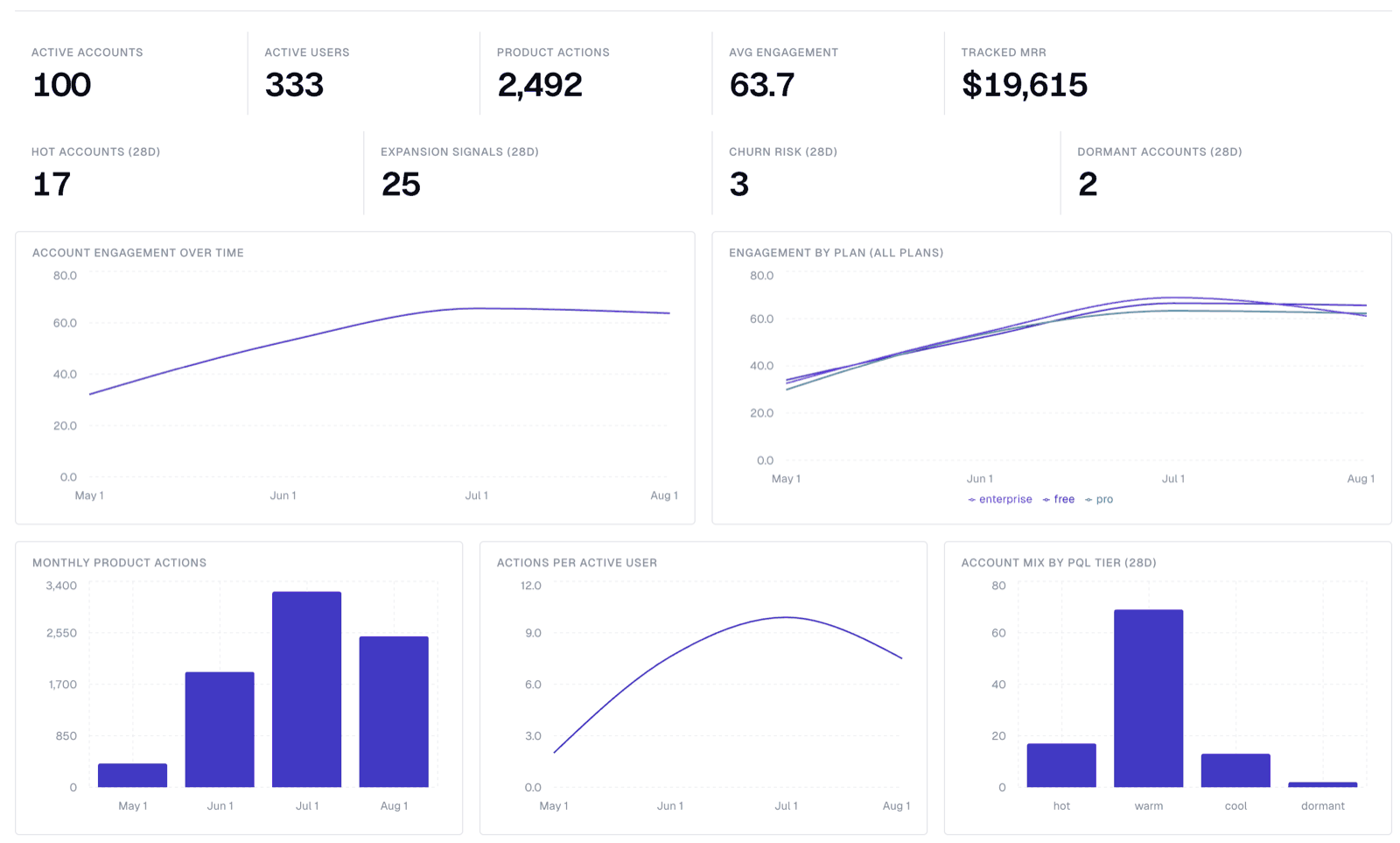
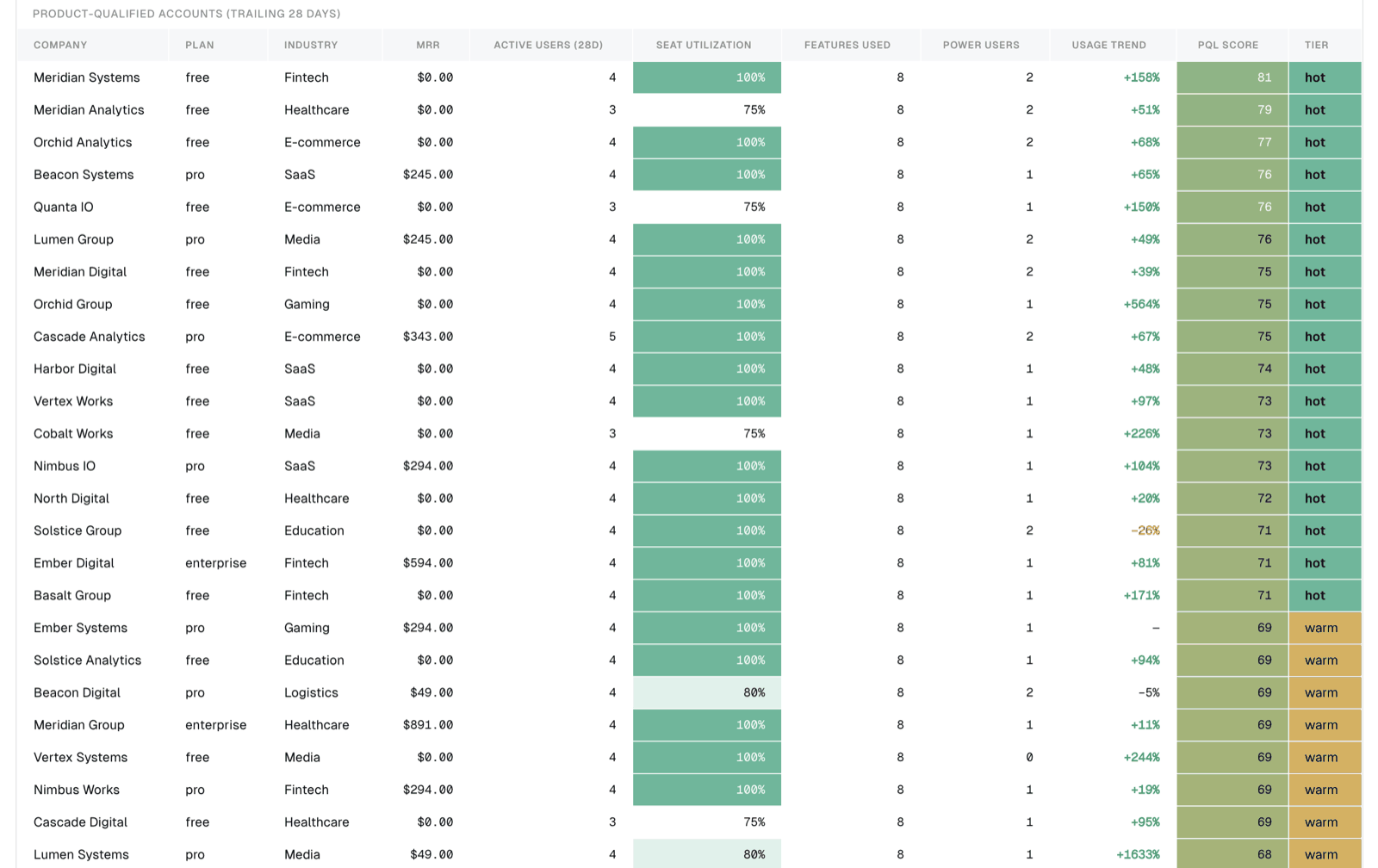
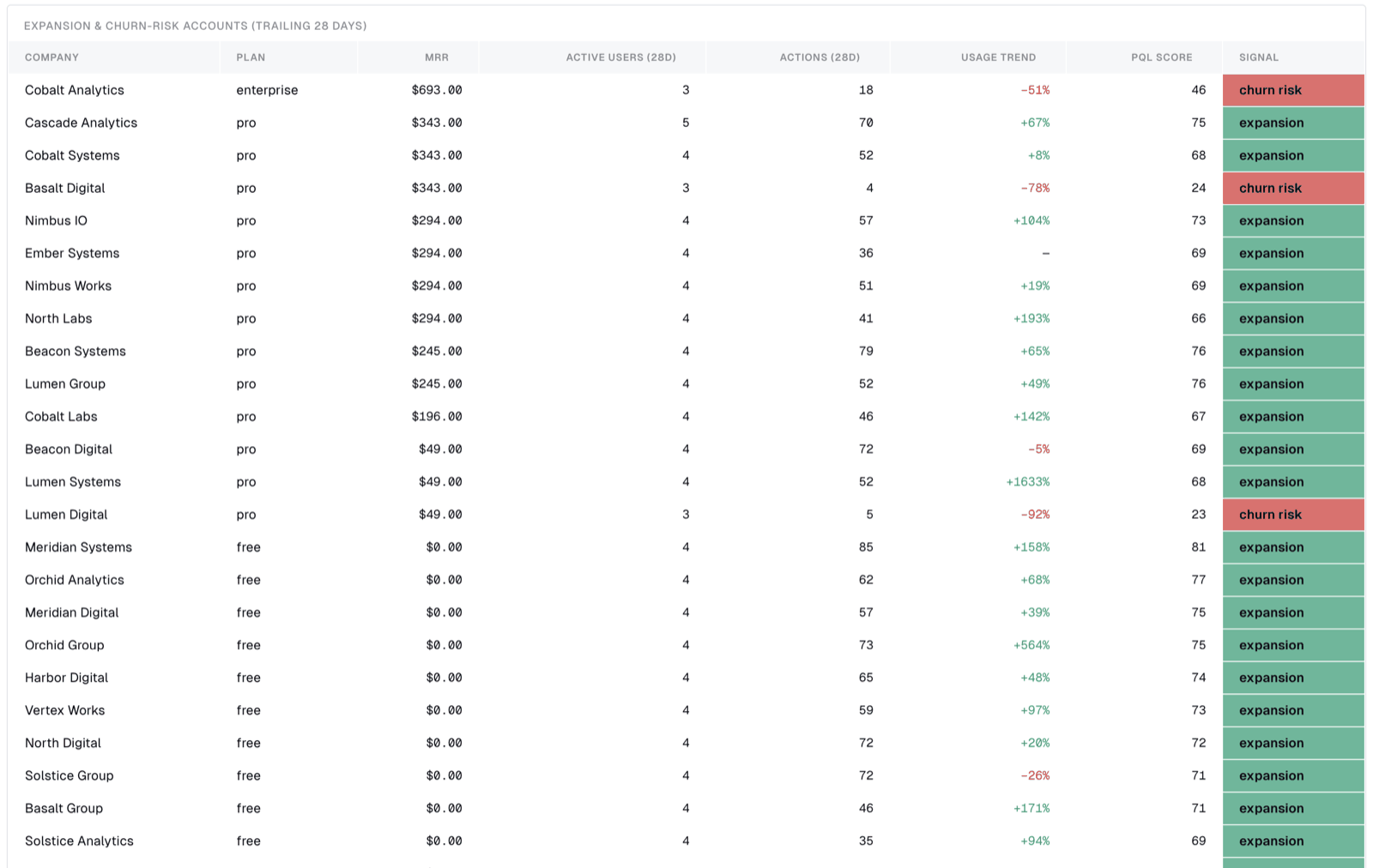
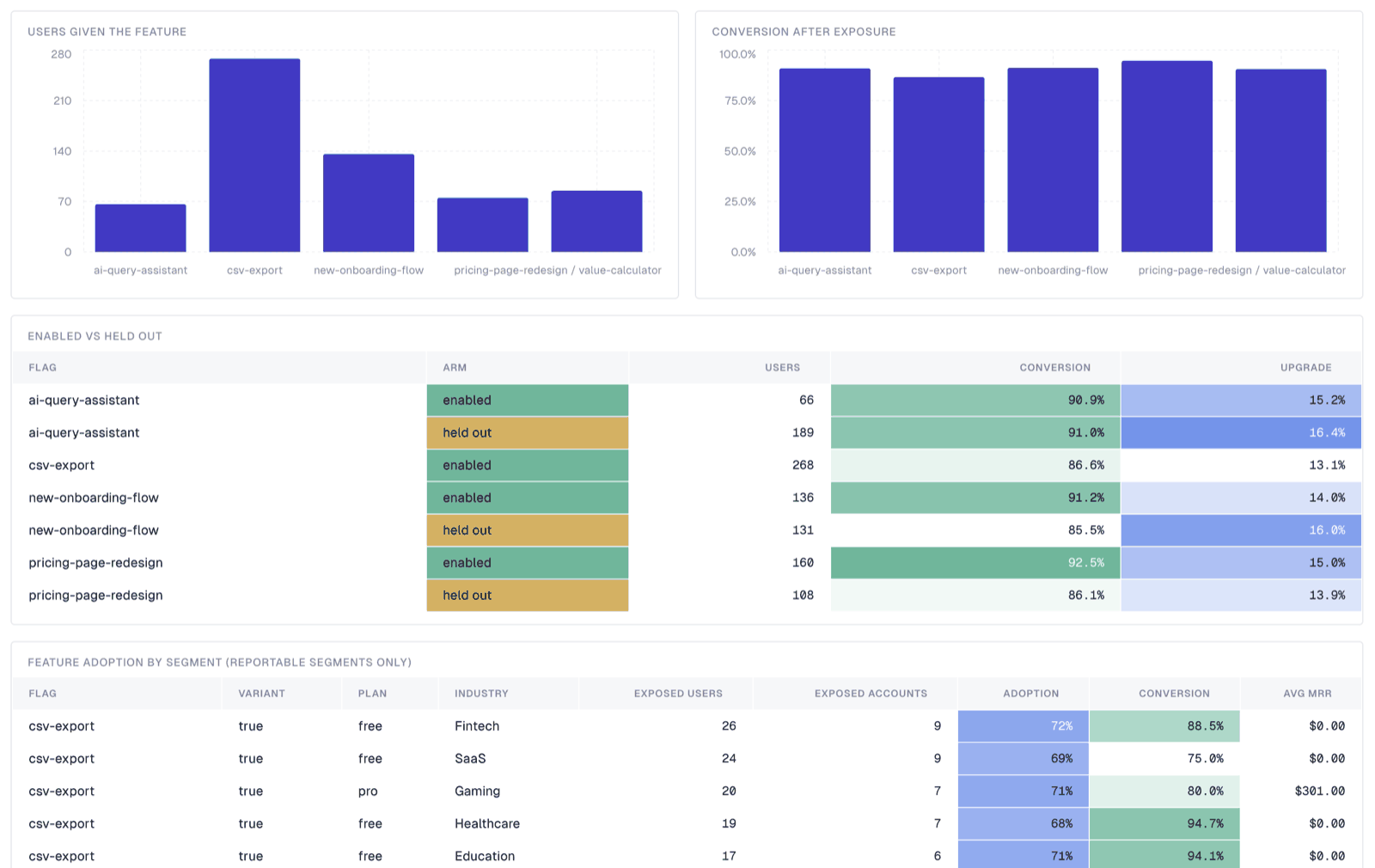
dashboards/posthog-product-analytics.yml is a DAC dashboard over the reports layer: headline account KPIs, engagement trend by plan, a PQL leaderboard with conditional formatting, an expansion/churn-risk table, feature adoption, and retention.
Install a verified DAC release with the DAC installation guide, then, from the pipeline directory:
dac --config .bruin.yml validate --dir dashboards
dac --config .bruin.yml check --dir dashboards
dac --config .bruin.yml serve --dir dashboards --port 8321
The date-range filter drives the engagement, adoption, and retention widgets. The product-qualified-account widgets are labelled "28d" because that report is a trailing-28-day snapshot measured from the last day of event data, so it deliberately does not move with the range.
Account overview — headline KPIs, engagement trend by plan, and the split of accounts across PQL tiers.
PQL leaderboard — accounts ranked by product-qualified score, with the seat, breadth, depth, and trend inputs behind each score.
Expansion and churn risk — paying accounts whose usage trend has moved far enough to be worth a sales or success conversation.
Feature adoption — flag exposure and follow-on conversion, including the enabled-versus-held-out comparison and per-segment adoption.
Retention — the weekly retention curve and week 1/4/8 retention broken out by signup source.
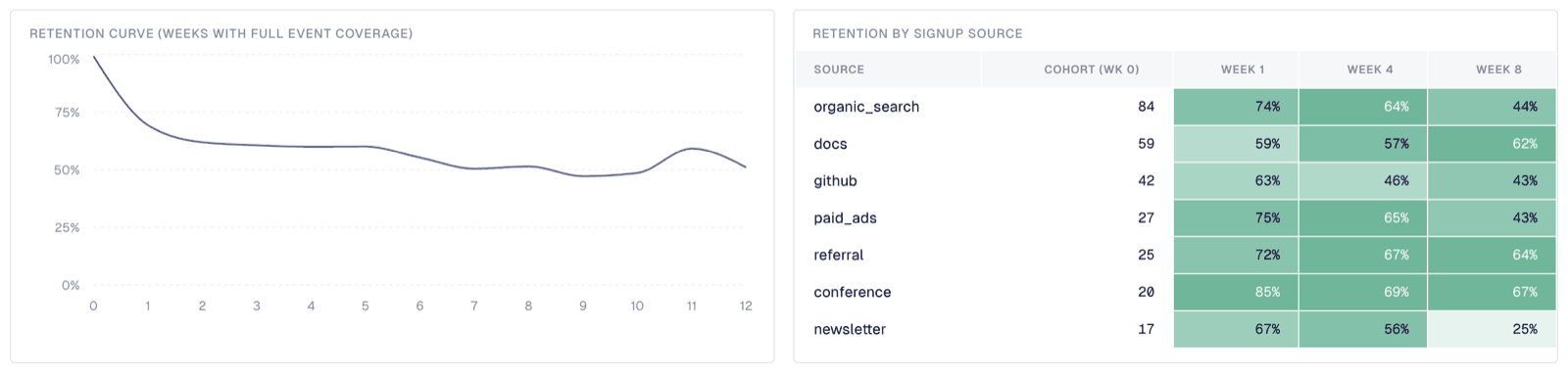
Two widget conventions — the adoption widgets filter on was_enabled and the retention widgets on is_complete_week — are deliberate (details).
Adapt this to your project
Stripe and Shopify have fixed schemas. PostHog does not — every project invents its own event names and person properties, so any PostHog template has to pick examples and tell you where to change them. These are this template's.
Event names live entirely in pipeline.yml. Nothing in the SQL names an event, so this is the only file you edit:
| Variable | Default | Drives |
|---|---|---|
product_action_events | 8 Bruin-flavoured events (pipeline_run_started, query_executed, …) | product_actions, features_used, and the breadth and depth components of both scores |
conversion_events | signed_up, subscription_started | sessions.converted |
upgrade_events | subscription_started | upgrade_rate in the feature-adoption report |
revenue_events | invoice_paid, subscription_started | which events may read amount as money ($revenue is always read) |
Two more variables govern how those events are counted rather than which ones they are:
| Variable | Default | Drives |
|---|---|---|
conversion_window_days | 14 | how long after a flag exposure an action still counts as caused by it |
min_segment_users | 10 | smallest feature-adoption segment whose rates are marked is_reportable |
Scoring knobs are the other half of pipeline.yml. None of them are universal truths, which is why they are config rather than SQL:
| Variable | Default | Drives |
|---|---|---|
seat_denominator | reachable | whether seat activation is measured against known users or contracted seats |
pql_window_days | 28 | length of the PQL trailing window and the prior window it is compared against |
pql_hot_score / pql_warm_score / pql_cool_score | 70 / 45 / 20 | the pql_tier bands |
expansion_min_score | 65 | how long the expansion_signal queue is |
depth_target_actions | 40 | actions per active user that earn full marks on depth, in both scores |
session_depth_target_minutes | 10 | mean session length that earns full marks on session depth |
power_user_min_actions / power_user_min_active_days | 20 / 8 | what makes someone a power user |
Override any of them per run with --var, which parses values as JSON — so numbers are bare and strings need quotes:
bruin run --var pql_hot_score=85 --var seat_denominator='"contracted"' my-posthog-pipelineThe enum, minimum, and maximum keywords on these variables document intent rather than enforce it, though the SQL still guards the values that would otherwise silently produce wrong numbers (details).
Two of these are worth checking against your own data before you trust a ranking. seat_denominator decides whether the heaviest component measures rollout or licence coverage, which the scoring caveats cover in full. And depth_target_actions sets where the depth component saturates: too high and it reads near-zero for everyone, too low and it stops separating accounts.
Replace product_action_events with the events that mean someone got real value out of your product — the list length is the breadth denominator, so it scales automatically. Leaving a list empty is fine; the predicate collapses to FALSE and the pipeline still runs.
Person properties are set by your identify calls and read in assets/posthog_stage/persons.sql. The template expects nine:
| Property | Used for | If you don't send it |
|---|---|---|
company | The whole account layer | accounts is empty, and the two account-grain reports produce no rows |
plan | Plan segmentation, expansion signal | Every account reads unknown; the plan filter still works |
seats | Seat activation, the largest score component | Falls back to the count of known users, which is a reasonable proxy |
mrr | Revenue-weighted everything | Money columns are null; the reports still rank on usage |
is_paying | Churn-risk signal | Treated as false, so churn risk never fires |
industry | Segment dimension | Reads unknown |
signup_source | Retention by acquisition source | Reads unknown |
signup_date | Retention cohorts | weekly_retention_cohorts produces no rows |
initial_plan | Upgrade paths | Unused by the shipped reports |
The honest summary: send company, plan, and signup_date and everything works. Send none of them and you still get a clean, deduplicated, identity-resolved event and session layer — which is most of the value — but the account reports will be empty.
If your properties have different names, change the JSON_VALUE paths in posthog_stage/persons.sql. That is the only file that reads them.
Setup
1. Create the pipeline
Run this from the root of an existing Git project so Bruin adds the pipeline there:
bruin init posthog-bigquery my-posthog-pipeline2. Fill in the connections
Edit .bruin.yml with your GCP project and PostHog credentials:
connections:
  google_cloud_platform:
    - name: gcp-default
      project_id: your-gcp-project-id
      location: your-gcp-region
      use_application_default_credentials: true
  posthog:
    - name: posthog-default
      personal_api_key: ${POSTHOG_PERSONAL_API_KEY}
      project_id: ${POSTHOG_PROJECT_ID}
base_url: https://us.posthog.compersonal_api_key: a PostHog personal API key with read access to the project.project_id: the numeric project ID, visible in your PostHog project settings.base_url:https://us.posthog.comby default. Usehttps://eu.posthog.comfor EU cloud, or your own host for self-managed PostHog.
The template reads the key and project ID from environment variables, so export them before running:
export POSTHOG_PERSONAL_API_KEY=phx_...
export POSTHOG_PROJECT_ID=12345
3. Validate and run
bruin validate my-posthog-pipeline
bruin run my-posthog-pipeline
bruin validate reports a harmless in_string_list is not callable error for the assets that call the template's macros; the macros still render correctly at run time (details).
To load history, backfill posthog_raw.events with the one-day-per-run loop in Backfilling events — a wider window silently returns partial data — then build everything downstream in a single pass:
bruin run --exclude-tag posthog_raw my-posthog-pipelineExtending the template
- Add more source tables. Copy one of the asset files, change
nameandsource_table, and drop it inassets/posthog_raw/. The shared ingestr parameters come from thedefaultblock inpipeline.yml. - Join to your own data. The point of the staging layer is that
posthog_stage.persons.companyandemailare ordinary columns. Join them to your CRM accounts or billing tables and the reports gain real revenue context instead of the seededmrrproperty. - Partition the events table. For large projects, add a
materializationblock toevents.asset.ymlwithpartition_by: timestampto keep BigQuery scan costs down. - Make
posthog_stage.eventsincremental. Every model here is a full rebuild, which is fine at template scale and gets expensive once the event table is large, since it is re-read in full on every run. Switching it to atime_intervalmaterialization onevent_dateis the highest-value change; the reports downstream are small enough that rebuilding them is cheap.
Documentation
Appendix: notes, caveats & details
Backfilling events: use one day per run
This matters more than anything else in the template.
PostHog's /events REST API — the endpoint ingestr reads — does not return a complete history for a multi-day window, and gives no indication that anything is missing. Measured against one project, --full-refresh each time, three repeats per window (the results are deterministic):
| Window | Days | Events in PostHog | Events loaded | Days actually covered |
|---|---|---|---|---|
| 3 days | 3 | 1,679 | 545 | 1 |
| 7 days | 7 | 3,090 | 2,619 | 7, but 15% short |
| 31 days | 31 | 16,925 | 673 | 1 |
| 95 days | 95 | 42,354 | 1,551 | 4 |
| 205 days, sparse | 205 | 141 | 141 | all — complete |
| one day | 1 | exact | exact | 93 days tested, all exact |
The loss is not a function of how wide the window is. A three-day window returned a single day while a seven-day window spanned all seven, and a 205-day window over sparse data returned everything — so the limit tracks the volume of events in the window, not its width. There is no usable rule to exploit, because the seven-day case looks complete and is 15% short. A single day is the only window that is reliably exact.
So backfill a day at a time. Note the end date is the next day: bruin parses a bare date as midnight, so --start-date D --end-date D is a zero-width interval and fails with interval-start must be earlier than interval-end.
next_day() {
  if date --version >/dev/null 2>&1; then
    date -d "$1 +1 day" +%F                 # Linux (GNU date)
  else
    date -j -v+1d -f %Y-%m-%d "$1" +%F     # macOS (BSD date)
  fi
}

d=2026-05-23
while [ "$d" != "2026-08-22" ]; do
  nxt=$(next_day "$d")
  bruin run assets/posthog_raw/events.asset.yml --start-date "$d" --end-date "$nxt"
  d="$nxt"
done
The same off-by-one applies to any single-day run, including persons and feature_flags: --end-date 2026-08-21 stops at midnight, so a profile edited at 06:50 that morning is outside the window.
extract_partition_by does not help here. Ingestr rejects it for this source — "source table events does not support extract partitioning; supported sources are postgres, mysql, mssql, sqlite, and ADBC-backed SQL sources" — because it windows SQL extractions and PostHog is a REST source. It is also mutually exclusive with --full-refresh.
Day-to-day scheduled runs are unaffected, since each one already covers a single day. Only wide backfills are at risk.
events is also append-only, so re-running a day duplicates its rows. The staging layer deduplicates on id, which makes re-runs safe.
persons and feature_flags merge on id and are unaffected by any of this.
How this differs from PostHog out of the box
PostHog is good at what it does, and a lot of this template's value is not that PostHog can't answer these questions — it's that the answers live in your warehouse, next to everything else.
| PostHog out of the box | This template | |
|---|---|---|
| Account-level analysis | Group Analytics, but only if you sent $groups on events at capture time. It cannot be applied retroactively, and it's a paid add-on. | Accounts are derived in SQL from person properties, so it works on events you already collected. If you never instrumented $groups, the account reports still build. |
| Getting data out | Batch export to BigQuery delivers the raw event stream. | The same data, plus deduplication, identity resolution, sessionization, account rollup, and reports — modeling, not just export. |
| Joining to billing / CRM / support | Not possible; PostHog only knows what you send it. | posthog_stage.persons exposes company and email as ordinary columns. Join them to your own tables and the reports gain real revenue context. |
| Custom metrics | Trends, funnels, retention, paths and stickiness, plus HogQL for anything else — but only over data PostHog holds. | The same SQL freedom over the joined warehouse. The PQL and engagement scores are weighted CTEs you can rewrite. |
| Experiment readout | Conversion per variant, with built-in significance testing. | The same exposure data crossed with plan, industry, and MRR — which variant won among accounts worth money. |
| History | Bounded by your plan's retention window. | Bounded by your warehouse, which is usually cheaper per GB-year. |
What PostHog still does better, and what this template does not replace: session replay and heatmaps, real-time dashboards, built-in experiment statistics, and requiring no pipeline to maintain. Run both — this is a complement to the PostHog UI, not a substitute for it.
Staging internals
Three details worth knowing.
posthog_raw.events is append-loaded, so re-running a day duplicates rows there; posthog_stage.events keeps only the most recently loaded copy of each event id, which makes re-runs safe. The tiebreaker on timestamp keeps that choice stable, so rebuilding from unchanged input gives an identical table.
PostHog merges anonymous visitors into identified people over time, so a person owns several distinct IDs. person_distinct_ids is the single place that resolution happens: it collapses the map to one person per distinct ID and asserts that with a unique check, so no downstream join can quietly fan an event out across two persons and inflate every count built on it.
accounts exists for the same reason. PostHog has no account entity unless $groups was instrumented at capture time, so the rollup — highest plan tier anyone holds, MAX of seats and MRR, modal industry — is derived once here instead of being copy-pasted into four reports that could then drift apart. An account whose people carry no recognized plan gets unknown rather than NULL, so it stays reachable from the dashboard's plan filter.
Scoring caveats
Two things about those components are worth knowing before you trust a ranking.
Seat activation is the heaviest component and the easiest to get backwards. It carries 30 engagement points and 20 PQL points, and its denominator — posthog_stage.accounts.licensed_seats, set by the seat_denominator variable — has to reconcile two different populations. seats comes from billing; the numerator counts people PostHog has seen, which means people an identify call has run for. An account that bought 400 seats and rolled out to 40 reads as 10% activated, so left unqualified the component ranks small accounts above large ones and inverts the plan comparison. The default is therefore LEAST(seats, known_users), which measures activation against the reachable team and treats the gap to the contract as a coverage question. Switch it back to seats in accounts.sql if your identify coverage matches your billing — that is what seat_denominator: contracted does. The seats information is not lost either way: posthog_stage.accounts.seat_coverage reports known users over contracted seats on its own, so a rollout that has not reached most of its licences shows up as a coverage number rather than as a low engagement score.
The score thresholds set queue length, not truth. pql_hot_score, pql_warm_score, pql_cool_score, and expansion_min_score decide how many accounts land in front of a human, and the right numbers depend on how your scores actually spread. On a test project where nearly every account was active, the default expansion_min_score of 65 fired on a quarter of them — technically correct, operationally useless. Look at COUNTIF(expansion_signal) / COUNT(*) and the pql_score quartiles on your own data, then raise the thresholds rather than the headcount.
Breadth saturates. It is a count out of product_action_events, so once an account has touched every event on the list the component stops discriminating — on one test project half the accounts sat at the ceiling. This is the one component with no variable to tune, because the fix is a different measure rather than a different constant: count distinct days per feature, or weight the rarer actions, instead of the plain distinct count.
Account attributes come from posthog_stage.accounts, so the rollup rule is stated once: plan is the highest tier held by anyone at the company, seats and MRR are MAX (they repeat on every person row), industry is the modal value. persons is a current-state snapshot with no history, so today's plan is carried onto historical months.
Dashboard widget conventions
Two widget conventions are deliberate. The adoption widgets filter on was_enabled, so a boolean flag's false arm — everyone the rollout held out — is not counted as having adopted the feature; the "Enabled vs Held Out" table is where the two arms are compared. And the retention widgets filter on is_complete_week, which excludes weeks at either end of the event history that the warehouse cannot speak to.
Variable validation and macro loading
The enum, minimum, and maximum keywords on these variables are currently documentation rather than enforcement — Bruin validates that a variable has a default and little else, and --var overrides skip schema checks. Where getting a value wrong would silently produce plausible-but-wrong numbers rather than an obvious break, the SQL fails the run itself: an unrecognised seat_denominator stops posthog_stage.accounts with seat_denominator must be "reachable" or "contracted", got … instead of quietly falling back to a default.
bruin validate currently reports in_string_list is not callable for the assets that call the template's macros. The macros render correctly at run time; validation does not load the macros/ folder (bruin#2588).