Stripe Billing Analytics to BigQuery
At a glance
- Pulls your Stripe customers, subscriptions, invoices, and prices into BigQuery
- Cleans that raw data into tidy, reusable billing tables
- Publishes monthly reports on recurring revenue, churn, and invoices
- Tracks MRR and ARR per customer and per currency
- Saves a daily snapshot so month-over-month trends build up over time
- Comes with a ready-made dashboard for revenue, retention, and billings
- Safe to re-run, and easy to adapt to your own reporting
- Builds the foundational billing models and context an AI agent can analyze and act on
stripe-bigquery is a focused Stripe billing analytics pipeline for BigQuery. It loads the customer, product, price, subscription, subscription-item, and invoice resources into stripe_raw; builds reusable billing models in stripe_stage; and publishes recurring-revenue and invoice-billing reports in stripe_reports.
The template contains 19 assets across three layers. It is a practical starting point for analyzing Stripe subscription billing while keeping the data model small enough to adapt to your own reporting needs.
Project structure
stripe-bigquery/
├── pipeline.yml
├── README.md
├── dashboards/
│   └── stripe-billing-analytics.yml
└── assets/
    ├── stripe_raw/
    │   ├── customer.asset.yml
    │   ├── product.asset.yml
    │   ├── price.asset.yml
    │   ├── subscription.asset.yml
    │   ├── subscription_item.asset.yml
    │   └── invoice.asset.yml
    ├── stripe_stage/
    │   ├── customers.sql
    │   ├── products.sql
    │   ├── prices.sql
    │   ├── subscriptions.sql
    │   ├── subscription_items.sql
    │   ├── invoices.sql
    │   ├── invoice_line_items.sql
    │   ├── subscription_item_daily_snapshot.sql
    │   └── customer_currency_daily_mrr_snapshot.sql
    └── stripe_reports/
        ├── monthly_mrr_by_customer.sql
        ├── monthly_mrr_movements.sql
        ├── monthly_subscription_kpis.sql
        └── monthly_invoice_billings.sql
What it creates
Raw Stripe data
The stripe_raw dataset contains the six Stripe resources that underpin the billing models. Ingestr loads them with the shared stripe-default connection, and BigQuery is the destination.
Each source asset uses ingestr's incremental Stripe mode (<endpoint>:sync:incremental) with a merge materialization keyed on the Stripe object id, so a run only fetches the records created inside its own time window and upserts them. See Incremental-loading trade-offs for how mutable resources, re-run cadence, and column-schema pinning are handled.
Conformed billing models
The stripe_stage dataset exposes typed customer, product, price, subscription, subscription-item, invoice, and invoice-line-item models. It also builds daily snapshots of subscription items and customer MRR by native currency, stamped with the pipeline end date.
Most stage and report assets are materialized as a CREATE OR REPLACE TABLE, so each run rebuilds its table from the current raw data. That keeps the pipeline idempotent and easy to reason about. The two daily snapshot assets are the exception; see Snapshot & backfill mechanics for how they accumulate history and why the first load needs --full-refresh.
Billing reports
The stripe_reports dataset provides four ready-to-query tables:
monthly_mrr_by_customer— month-end observed MRR and annualized run rate by billing customer and currency.monthly_mrr_movements— customer-level new, reactivation, expansion, contraction, and churn movements.monthly_subscription_kpis— recurring-revenue, retention, and customer-count metrics by currency.monthly_invoice_billings— non-draft, non-void invoice billings by finalization month, with a labeled creation-date fallback.
See Metric policy & definitions for how these metrics are defined and the caveats that apply, and Illustrative report rows for sample output from each table.
Asset summary
All 19 assets materialize as tables. create+replace is the default when no incremental strategy is listed, so those assets are rebuilt from their upstreams on every run.
| Schema | Asset | Materialization | Incremental strategy | Partition | Purpose |
|---|---|---|---|---|---|
stripe_raw | customer | table | merge (upsert on id, cursor created) | — | Load Stripe customers into BigQuery |
stripe_raw | product | table | merge (upsert on id, cursor created) | — | Load Stripe product catalog into BigQuery |
stripe_raw | price | table | merge (upsert on id, cursor created) | — | Load Stripe prices into BigQuery |
stripe_raw | subscription | table | merge (upsert on id, cursor created) | — | Load Stripe subscriptions into BigQuery |
stripe_raw | subscription_item | table | merge (upsert on id, cursor created) | — | Load Stripe subscription items into BigQuery |
stripe_raw | invoice | table | merge (upsert on id, cursor created) | — | Load Stripe invoices into BigQuery |
stripe_stage | customers | table | create+replace | — | Conform billing accounts and metadata keys |
stripe_stage | products | table | create+replace | — | Conform product catalog for packaging analysis |
stripe_stage | prices | table | create+replace | — | Conform prices with recurring-cadence attributes |
stripe_stage | subscriptions | table | create+replace | — | Conform current subscription, trial, and cancellation state |
stripe_stage | subscription_items | table | create+replace | — | Join items to prices and normalize gross MRR |
stripe_stage | invoices | table | create+replace | — | Conform invoice facts for billings and AR |
stripe_stage | invoice_line_items | table | create+replace | — | Flatten Stripe's embedded invoice-line payload |
stripe_stage | subscription_item_daily_snapshot | table | delete+insert on snapshot_date | snapshot_date | Accumulate daily subscription-item MRR observation history |
stripe_stage | customer_currency_daily_mrr_snapshot | table | delete+insert on snapshot_date | snapshot_date | Accumulate daily customer-currency MRR observation history |
stripe_reports | monthly_mrr_by_customer | table | create+replace | — | Month-end MRR and run-rate ARR per customer |
stripe_reports | monthly_mrr_movements | table | create+replace | — | Classify new, expansion, contraction, and churn movements |
stripe_reports | monthly_subscription_kpis | table | create+replace | — | Recurring-revenue, retention, and customer-count scorecard |
stripe_reports | monthly_invoice_billings | table | create+replace | — | Invoice billings by finalization month and currency |
The two snapshot assets are partitioned on snapshot_date; see Partitioning rationale for why.
Column-level documentation
Every asset in all three layers declares its full column schema: each column carries a type, a description, and primary-key marks on the grain, so the reporting grain and the metric definitions are readable from the asset files themselves. metadata_push in pipeline.yml publishes those descriptions to the BigQuery table and column metadata, and bruin docs my-stripe-pipeline generates a browsable documentation site from the same schemas.
Configure connections
Initializing the template adds placeholder connections to the repository-level .bruin.yml. Keep the connection names gcp-default and stripe-default, or rename them consistently in both .bruin.yml and pipeline.yml.
default_environment: default

environments:
  default:
    connections:
      google_cloud_platform:
        - name: gcp-default
          project_id: your-gcp-project-id
          location: your-gcp-region
          use_application_default_credentials: true
      stripe:
        - name: stripe-default
          api_key: ${STRIPE_API_KEY}
Replace both BigQuery placeholders before running the pipeline:
project_id— the Google Cloud project that owns the BigQuery datasets this pipeline writes to, for examplemy-company-analytics.location— the region or multi-region of those datasets, for exampleUS,EU, oreurope-west3. It must match the location of the existing datasets; BigQuery cannot query a dataset from a different location. See BigQuery locations.
The connection uses Application Default Credentials, so authenticate with gcloud once:
gcloud auth application-default loginTo use a service account instead, replace use_application_default_credentials: true with service_account_file: /path/to/service-account.json. Either way, the credentials need permission to create datasets and tables and to run queries in the project.
Set the Stripe secret key in your shell before running the pipeline:
export STRIPE_API_KEY='sk_test_your_secret_key'Use either an sk_test_... or sk_live_... secret key. A publishable pk_... key cannot read Stripe data. Keep test and live data in separate BigQuery projects or datasets and do not commit credentials. The ingestr docs cover where to find the key and how to create a restricted key with read-only access to the resources this pipeline loads.
Run the pipeline
Initialize a project from the template:
Run this from the root of an existing Git project so Bruin adds the pipeline there:
bruin init stripe-bigquery my-stripe-pipelineSet start_date in pipeline.yml to the earliest Stripe history you need, then run the fast validation checks:
bruin validate --fast my-stripe-pipelineOn a new BigQuery destination, load every table before running query validation. The raw assets load only their run window, so pass an explicit range to pull your Stripe history in the first load. Use --full-refresh on this first run: the two daily snapshot assets use delete+insert, which writes into an existing table, so their tables have to be created before a normal run can add days to them.
bruin run --full-refresh --start-date 2023-01-01 --end-date $(date -u +%F) \
  --no-validation my-stripe-pipeline
After the initial load, run bruin validate my-stripe-pipeline and schedule the pipeline daily without --full-refresh:
bruin run --start-date $(date -u +%F) --end-date $(date -u +%F) my-stripe-pipelineAny run is safe to repeat. The raw assets upsert on id, the other stage and report assets are rebuilt with create+replace, and the two snapshot assets replace only the snapshot_date they observe, so re-running a date does not duplicate rows or drop the days around it. Avoid --full-refresh after the initial load: it rebuilds the snapshot tables from scratch and discards the accumulated history.
Customize it
Use the stage models as a stable interface for your own reports. Review the selected assets, source fields, quality checks, and metric policy before using the results for financial reporting. Extend the pipeline with your business definitions, identity mapping, and FX policy where required.
View the billing dashboard
The included DAC dashboard visualizes native-currency MRR, ARR, customer count, retention, movement components, invoice billings, and the latest customer MRR distribution. The customer breakdown labels each account by company name (falling back to CRM account or Stripe customer id) and lists a deep link to open the customer in the Stripe Dashboard. It deliberately filters to one currency at a time because no FX rates are applied. The reporting tables retain money in native minor units; the dashboard queries divide by the selected currency's exponent so the widgets read in major units, using a divisor of 1 for Stripe's zero-decimal currencies.
After configuring gcp-default, install a verified DAC release by following the DAC installation guide. Then install its dashboard-authoring skill from the project root:
dac skills install --dir . create-dashboardRestart your coding agent after installing the skill so it can use the local create-dashboard instructions. Then validate the dashboard, execute its queries, and serve the DAC app:
dac --config .bruin.yml validate --dir dashboards
dac --config .bruin.yml check --dir dashboards
dac --config .bruin.yml serve --dir dashboards --port 8321
Dashboard preview
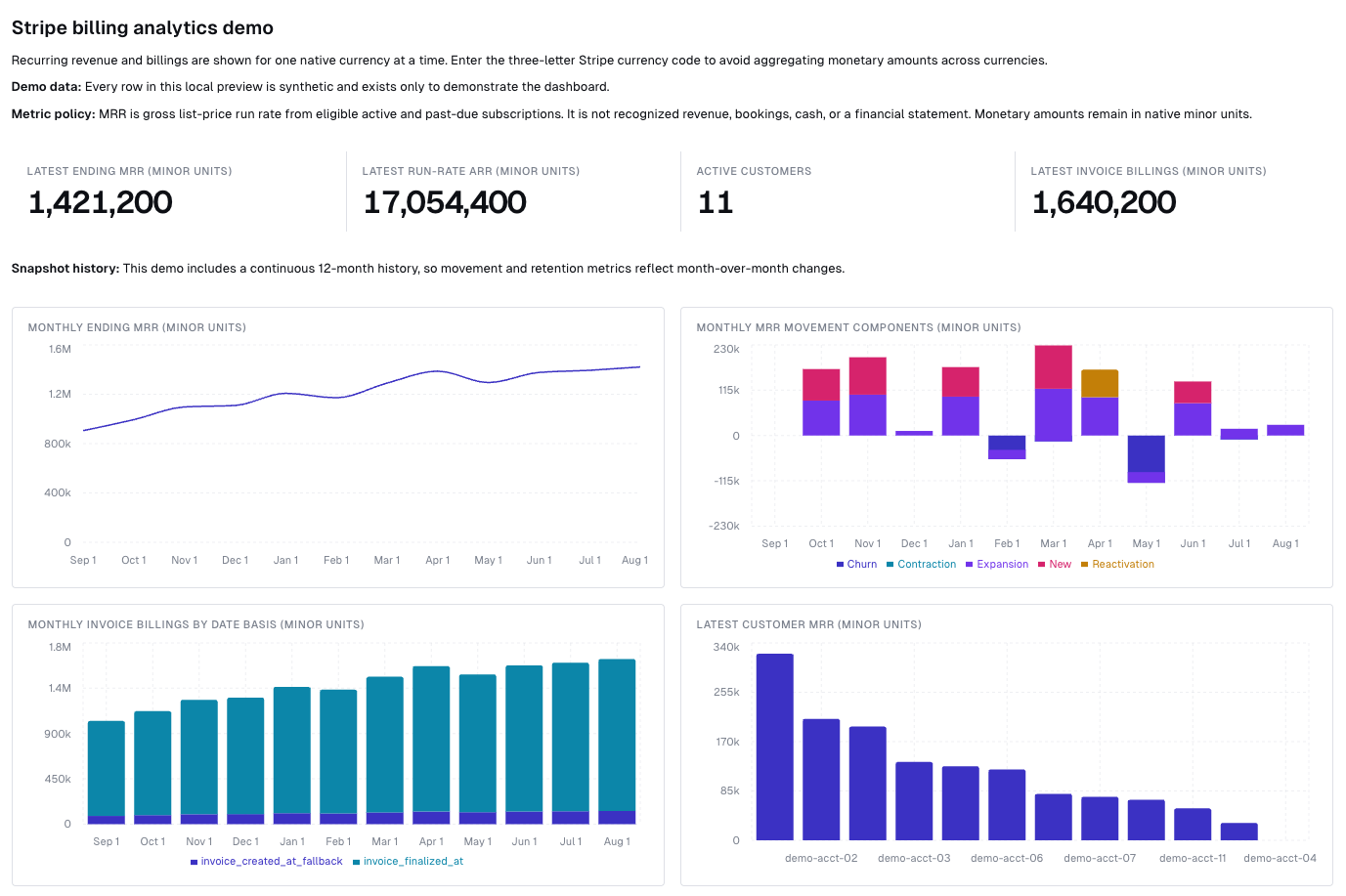
This screenshot uses synthetic data solely to demonstrate the dashboard's layout and charts.
MRR movement and retention metrics need two contiguous monthly snapshots, so they stay empty until the accumulated snapshot history spans a second month.
Appendix: notes, caveats & details
Incremental-loading trade-offs
Incremental mode filters on Stripe's created timestamp and does not revisit records created in earlier windows. That matters for the mutable resources — a subscription cancelled or upgraded months after it was created, an invoice finalized, paid, or voided after its creation date. To pick those edits up, periodically re-run over a wider window:
bruin run --start-date 2023-01-01 --end-date $(date -u +%F) my-stripe-pipelineChoose that cadence to match how current your reporting needs to be, or switch the mutable assets to source_table: subscription for standard async loading, which reloads full history on every run. See loading modes and trade-offs for the comparison.
Each raw asset also declares its full column schema, which pins those columns into the destination table. That matters for fields Stripe leaves null on some accounts: invoice.due_date is only set for invoices collected with send_invoice, and a schema inferred purely from the data would drop the column and break the stage model.
Snapshot & backfill mechanics
The two daily snapshot assets are the exception. They use delete+insert on snapshot_date, so each run replaces only the day it observes and leaves earlier days in place. That accumulates the daily observation history the reports layer needs for month-over-month movement and retention, while keeping a re-run of any single date idempotent. Because delete+insert writes into an existing table, the first load has to create these two tables with --full-refresh; see Run the pipeline.
The snapshots record the Stripe state visible when the pipeline runs, so history builds up from the first run forward and cannot be backfilled from current Stripe records.
Metric policy & definitions
All monetary values in the stripe_stage and stripe_reports tables remain in each currency's minor units; only the dashboard converts to major units for display. Do not add amounts across currencies without an FX source and explicit conversion policy.
MRR is a gross list-price run rate from active and past-due subscriptions with licensed recurring monthly or annual prices. Free, one-time, metered, and discounted amounts are excluded. Run-rate ARR is MRR multiplied by 12; neither measure is recognized revenue, bookings, cash, or a financial statement.
The daily snapshots capture the Stripe state visible when the pipeline runs. They do not reconstruct prior daily MRR history from current Stripe records, so the accumulated history starts at the first run. Month-over-month movement and retention metrics need two contiguous monthly observations, so they stay empty until the snapshots span a second month.
Partitioning rationale
The two snapshot assets are partitioned on snapshot_date because they accumulate indefinitely: their per-run DELETE prunes to the single day being replaced instead of scanning the whole history. The other assets are rebuilt in full each run, so partitioning would not save any scan.
Illustrative report rows
The following illustrative rows use minor currency units: 9900 USD means $99.00. They show the shape of each table across several months, which fills in once the snapshots have accumulated that many months of history; see Conformed billing models. Query the four tables in stripe_reports directly, then adapt the columns to the definitions used by your finance and revenue teams.
monthly_mrr_by_customer
| metric_month | as_of_snapshot_date | stripe_customer_id | currency | active_subscription_count | ending_mrr_minor | run_rate_arr_minor |
|---|---|---|---|---|---|---|
| 2026-01-01 | 2026-01-31 | cus_acme | usd | 1 | 9900 | 118800 |
| 2026-02-01 | 2026-02-28 | cus_acme | usd | 1 | 12900 | 154800 |
| 2026-02-01 | 2026-02-28 | cus_pine | usd | 2 | 4900 | 58800 |
monthly_mrr_movements
| metric_month | stripe_customer_id | currency | beginning_mrr_minor | ending_mrr_minor | expansion_mrr_minor | churned_mrr_minor | movement_type |
|---|---|---|---|---|---|---|---|
| 2026-02-01 | cus_acme | usd | 9900 | 12900 | 3000 | 0 | expansion |
| 2026-02-01 | cus_oak | usd | 2500 | 0 | 0 | 2500 | churn |
| 2026-02-01 | cus_pine | usd | 0 | 4900 | 0 | 0 | new |
monthly_subscription_kpis
| metric_month | currency | ending_mrr_minor | new_mrr_minor | expansion_mrr_minor | churned_mrr_minor | ending_active_customer_count | net_revenue_retention_rate_excluding_reactivation |
|---|---|---|---|---|---|---|---|
| 2026-01-01 | usd | 12400 | 12400 | 0 | 0 | 2 | — |
| 2026-02-01 | usd | 17800 | 4900 | 3000 | 2500 | 2 | 1.04 |
| 2026-02-01 | eur | 8100 | 0 | 1100 | 0 | 1 | 1.16 |
monthly_invoice_billings
| invoice_billing_month | invoice_billing_date_basis | currency | issued_invoice_count | subscription_invoice_count | invoiced_billings_minor | invoiced_subscription_billings_minor |
|---|---|---|---|---|---|---|
| 2026-01-01 | invoice_finalized_at | usd | 14 | 12 | 139400 | 128700 |
| 2026-02-01 | invoice_finalized_at | usd | 16 | 13 | 171800 | 160200 |
| 2026-02-01 | invoice_created_at_fallback | eur | 2 | 2 | 16200 | 16200 |